Two searches, in order
Release builds compile string resources into resources.arsc. The file res/values/strings.xml that you edit in source is usually not stored as XML inside the APK. This page admits that, and it still looks, because some debug or oddly packaged archives do contain the raw file.
After JSZip opens the APK in the tab, the script lists entries whose paths match res/values…/strings….xml at exactly that depth: a values directory with an optional suffix such as -fr, then a file whose name starts with strings and ends with .xml. Nested folders do not match. If any files match, you can preview one and download the selected files or all of them as a zip of the original bytes.
If none match, the page says so. That message is the normal result for a Play release, not a broken upload.
The compiled scan is not a parser
The second step reads resources.arsc as a byte array. It collects UTF-8 runs and UTF-16LE runs of at least 4 characters, trims them, drops anything longer than 180 characters, and unique-sorts what remains. You can download that list as .txt or as JSON with the file name, a timestamp, the count, and the strings. The page does not walk the ARSC chunk format. It does not attach a resource id, a string name, or a locale. The same visible sentence can appear once in the list even if many locales contain it, and binary noise that happens to be printable can appear beside real UI copy.
If resources.arsc itself is missing, the page says the archive may be incomplete. A density split might hold a different resource table than the base. Drop the file you mean to read. This tool will not merge splits.
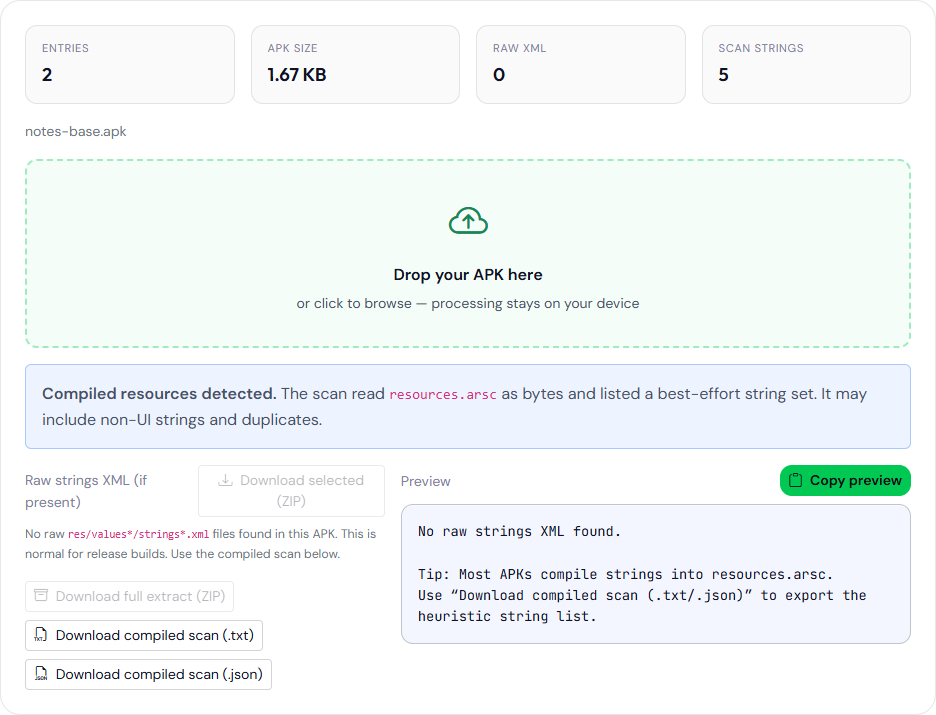
notes-base.apk. Zero raw strings.xml files and five strings from the resources.arsc byte scan. Not a Play release.How to use a noisy list
Search the download for things you would not ship: a TODO, a staging host, a personal email, or a debug label. When you find one, confirm it in source or with Android Studio’s APK Analyzer, which reads the real resource table. Deleting a line from the text download does not remove it from the APK.
Do not send the list to a translator as if it were strings.xml. Order is alphabetical after the unique step, not the order of the resource file. Placeholders such as %1$s may survive if they were stored as that text. HTML and styled strings may be split or joined depending on how they were encoded in the binary. The 180-character cut means a long legal sentence can vanish from the scan while remaining in the app.
A worked pattern: you expect the English app name to be “Northwind Notes.” Search the txt download. If it is there, you have a hint the title survived packaging. If it is absent, the string may be longer than 180 characters, stored in a form this scan misses, or living in another split. Absence is not proof the app has no title. The analyzer’s label hint is a different scan, of the manifest only, and it is also a hint.
What you can download
- One raw XML file, if the list has one and you select it.
- A zip of every matching raw XML file.
- The compiled scan as text, one string per line.
- The compiled scan as JSON.
- A zip that includes whichever of those the page has. Buttons stay disabled until that data exists.
Downloads are produced in the browser. The APK is not uploaded. JSZip still has to load from the CDN for the archive to open. See what these tools send.
The compiled-scan download for that file is five lines:
app_name
attr
com.example.notes
Northwind Notes
string
Northwind Notes is the value of app_name in the sample’s res/values/strings.xml, which is what aapt dump badging prints as application-label. app_name, attr, and string are names and chunk words from the resource table, not UI copy. The scan does not say which line is which.
For a full pre-install pass, run the APK Analyzer first so you know which ZIP you are scanning. The job comparison with aapt is in the tool-choice table. If the scan count is in the thousands, do not read it top to bottom. Search for a host name you own, then for http://, then for a debug word you actually use in source. A hit is a lead. The resource name that produced it is still a question for aapt or for the source tree.