Published · Updated · 6 min read
How to analyze an APK without installing it
You can learn a lot from an APK without tapping Install. You cannot learn the decoded manifest tree from this site. This procedure says which question each page answers, and the command to run when the page stops.
What the file is
An APK is a ZIP archive with a particular layout. At the root you expect AndroidManifest.xml in binary XML, one or more classes.dex files, resources.arsc, a res/ tree, optional assets/, optional lib/<abi>/*.so, and META-INF signing files. Opening that ZIP does not execute the app. Installing it does. The point of a pre-install pass is to decide whether this is the file you meant to ship, and whether anything in the listing is a reason to stop.
Keep the APK you will actually upload or sideload. A debug APK, a staging flavor, and one split from a set will answer questions about a different artifact. If you were handed an .aab, build APKs with bundletool first. The steps below assume one .apk file. Split sets are covered in base APK versus splits versus bundles.
Step 1 — Hash the file and list the ZIP
Open the APK Analyzer and drop the file. The page loads JSZip from jsDelivr, then:
- Computes SHA-256 over the entire file with Web Crypto.
- Prints the entry count and an approximate uncompressed total.
- Counts entries whose names end in
.dex. - Says whether
AndroidManifest.xmlis present. If it is, the line says “binary AXML.” The page does not decode it. - Says whether any path starts with
lib/and ends with.so. - Scans printable ASCII strings in the manifest bytes for
package=,versionName,versionCode, and anandroid:labelhint. - Lists notable paths (manifest,
resources.arsc,META-INF, DEX,kotlin/,assets/), then the full entry list.
Copy the report into your notes. Compare the SHA-256 to the hash your build machine printed. If they differ, you are not holding the CI artifact, and the rest of this procedure describes the wrong file. If the manifest line says missing, stop. If DEX count is zero on a file you believe is a standalone app, stop and check that you did not drop a resource split or a renamed bundle.
The “Possible package” lines are hints. When they are blank, the report says the strings were not obvious. Do not fill them in from memory. Step 5 is the command that prints the real package name.
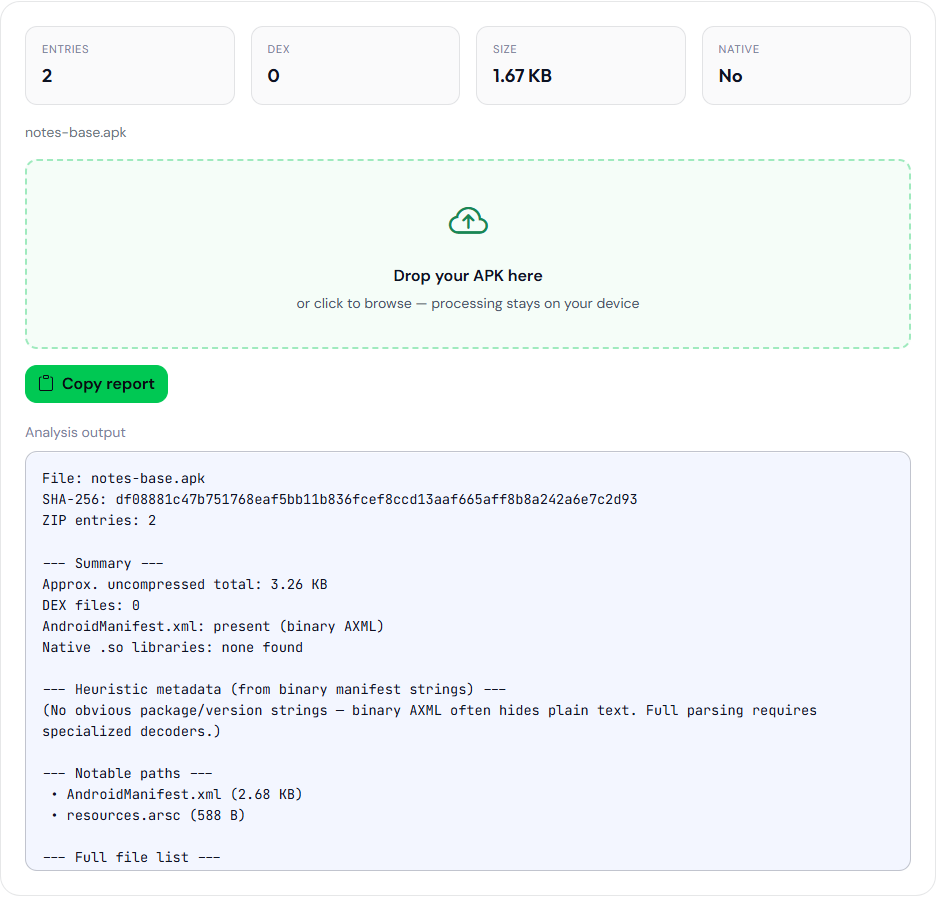
com.example.notes, notes-base.apk). The heuristic block is blank. Step 5 is what prints the package name and versionCode.Step 2 — Decide whether native code is in this ZIP
Read the file list for lib/. Write down every ABI folder you see: arm64-v8a, armeabi-v7a, x86_64, and so on. “Native .so libraries: none found” is true for this ZIP only. If you are looking at a base APK from a split set, open the ABI split before you conclude the app has no native code.
A leftover armeabi-v7a next to arm64-v8a makes the universal file larger. It is not automatically a bug. It is a fact you should intend. Play’s 64-bit requirement is about whether an arm64 library exists when you ship 32-bit native code, which you confirm with the path list or with aapt dump badging, not with the boolean alone.
Step 3 — Pull a permission list from text, not from the binary
The analyzer does not list uses-permission entries. Take the merged manifest from the build intermediates, or the XML from apktool d, or the text of aapt dump permissions. Paste that text into the Permissions Decoder.
The decoder keeps names that start with android.permission. and features that start with android.hardware.. Known permissions get a normal, dangerous, or special badge from a fixed table. Other names print as unknown. Unknown does not mean safe. QUERY_ALL_PACKAGES is unknown on this site because it is not in the table.
Write down every special row and every SMS, call-log, background-location, and all-files row. Those are the ones to reconcile with Play’s declaration forms. The policy reading is permissions Play still reviews. The on-device dialog timing is when Android shows a dialog. This step only produces the inventory.
Step 4 — Validate the text manifest you can edit
Paste the same text XML into the Manifest Validator. It uses DOMParser. It will reject binary XML. It checks:
- The root element is
manifest. packageis present. A value that does not look like a dotted application id is a warning, not a hard failure.xmlns:androidis present, as a warning if missing.applicationexists. Missing is an issue.uses-sdkandandroid:minSdkVersionexist, as warnings if missing.- Each
uses-permissionhasandroid:name. - Some activity combines MAIN and LAUNCHER. Missing is a warning, which is correct for a library that has no launcher.
It does not check android:exported. A file can pass and still fail to install on Android 12 and later. That gap is described in exported components after Android 12. Use the validator as a parse and a short structural list. Use lint or a device for the exported attribute.
The validator can pretty-print the text you pasted. Pretty-print is not a decode of the APK.
Step 5 — Leave the browser for the questions it cannot answer
Run these on your machine when the hint is blank or the decision matters:
aapt dump badging your.apk
aapt dump permissions your.apk
aapt dump xmltree your.apk AndroidManifest.xml
apksigner verify --print-certs your.apk
badging is the line that carries package name, versionCode, and versionName. Compare versionCode with every Play track for that application id before you upload. The three fields are separated in versionCode, versionName, and applicationId. apksigner prints certificates. The analyzer’s SHA-256 is not a certificate fingerprint. If Play App Signing is enabled, the installed APK will not hash to the upload file. That is explained in desk hash versus the installed APK.
Use apktool when you need editable XML or smali and you do not have the source. Treat that output as a view. The next Gradle build is the source of truth if you own the project.
Step 6 — Strings, only after the file is the right file
The APK String Extractor looks for raw res/values*/strings*.xml files, which release builds usually do not contain. It then scans resources.arsc for UTF-8 and UTF-16LE runs at least 4 characters long, drops anything longer than 180 characters, and unique-sorts the rest. You can download the scan as text or JSON. You do not get resource IDs, and you do not get a locale for each string. Use it to spot an obvious debug sentence or a URL you did not mean to ship. Do not use it as a translation report.
On this sample, the string extractor’s compiled scan includes the line Northwind Notes. That string is the value of app_name in the sample res/values/strings.xml, and aapt dump badging prints it as application-label:'Northwind Notes'. The scan also lists app_name, attr, and string, which are resource-table words, not sentences from the app.
Step 7 — Write the note you can attach to the build
A useful note is short and sourced:
File: notes-24004.apk
SHA-256: (from the analyzer, full hex)
aapt: package com.example.notes versionCode 24004 versionName 2.4.1
DEX: 2
ABIs: arm64-v8a
Special permissions: none
Dangerous: CAMERA, POST_NOTIFICATIONS
Validator: text manifest parsed, launcher present, exported not checked here
apksigner: upload cert fingerprint (or “not run”)
That note is enough to tell a later reader which file was inspected and which tools were trusted for which lines. It does not claim the app is policy-compliant. Policy forms are filled in Play Console. This procedure never opens Play Console.
If your organization forbids opening a production binary on a workstation that also runs ordinary web browsing, follow that rule. The analyzer keeps the bytes in the tab, and the page still loads JSZip, Bootstrap, and fonts from the network. It does not load an analytics tag. What leaves the machine is described in what these Android tools send.