Read the report from the top
The drop zone passes the file to JavaScript as an ArrayBuffer. Nothing is posted to droidxp.com. The script then refuses to continue if JSZip did not load from jsDelivr. There is no second parser. A blocked CDN means no listing and no hash, even though the hash itself would not need a ZIP library. That is how this page is built.
When JSZip loads, the report is a fixed sequence:
- File is the name the browser gave the drop.
- SHA-256 is
crypto.subtle.digest('SHA-256', buffer)over every byte of that file, printed as hex. It is not a certificate fingerprint and not the hash of one ZIP entry. - ZIP entries is the count of names in the archive, including directories.
- Approx. uncompressed total sums uncompressed sizes JSZip exposes. Directories count as zero. This is not the download size Play would show a device.
- DEX files counts names ending in
.dex.classes.dexandclasses2.dexare two. A resource split can legitimately be zero. - AndroidManifest.xml is “present (binary AXML)” or “missing.” Present does not mean you can read the XML. The page never decodes binary XML.
- Native .so libraries is “detected under lib/” if any path starts with
lib/and ends with.so. Otherwise “none found.” The boolean does not name the ABI. The file list does.
The heuristic block is a string scan
If the manifest entry exists, the script pulls its bytes and keeps printable ASCII runs of length 4 or more. It then looks for package=, versionName, versionCode, and android:label. Hits are labeled “Possible.” If package and versionName are both absent, the report says binary AXML often hides plain text and that a real decode needs another tool.
A blank heuristic is not an unsigned APK, not a missing version, and not an empty permission set. Permissions are not extracted at all. Paste a text manifest into the permissions decoder or run aapt dump permissions. Confirm versions with aapt dump badging.
Paths, and the 40-line cut
Notable paths are the root manifest, resources.arsc, anything under META-INF/, every .dex, anything under kotlin/, and anything under assets/. The report prints the first 40 of those with uncompressed sizes, then a “more” line. The full file list follows, one entry per line. META-INF names mean those entries exist. They are not an apksigner verify result.
A split APK is a successful analysis of that one ZIP. Libraries that live in split_config.arm64_v8a.apk will not appear when you drop only the base. An .aab is a different layout. If the root manifest is missing, believe that line and use bundletool. Renaming a bundle to .apk does not change the layout.
A numerical example you can compare
These figures are an illustration of how to read a report. They are a sample, not a measurement of an app published here. Suppose the output says: ZIP entries 412, uncompressed about 48 MB, DEX files 2, manifest present, native libraries detected, possible package com.example.notes, possible versionName 2.4.0, possible versionCode 24003. Two DEX files means multidex in this archive. Open the full list and write down each lib/<abi>/ folder before you decide the ABIs are correct. Compare the SHA-256 to CI. If versionCode is missing from the heuristic, leave the field blank in your notes until aapt prints it.
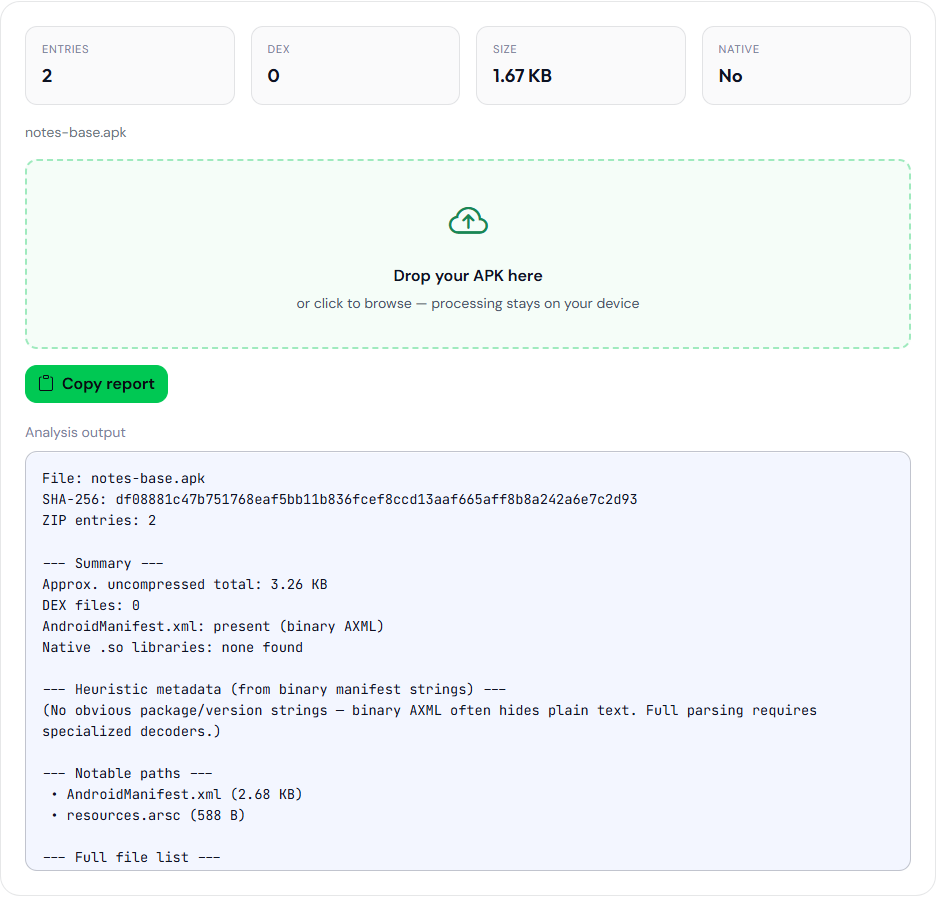
aapt package (package com.example.notes, file notes-base.apk). Not a Play upload and not an app published here. The heuristic is blank. aapt dump badging on the same file prints versionCode 24003.Mistakes that produce a confident wrong note
- Treating “Possible versionCode” as the integer Play has on file. Play’s track list is in Play Console. The heuristic is a guess about this file.
- Comparing this hash to an APK installed from Play when Play App Signing is on. The delivered file is re-signed. See why those hashes differ.
- Concluding there is no native code after opening one slice of a split set. See what one ZIP can see.
- Expecting a permission list or an
android:exportedaudit. This page does not do either.
The walkthrough that uses this report as step 1 is how to analyze an APK without installing it. What that report can and cannot do for a viewer, binary XML, images, and verify is view an APK online. The SHA-256 line is the whole file, which is a different value from a signing certificate: a file hash is not a signing certificate. Memory limits are the browser’s. A very large APK can hang the tab. That is a local failure, not a queued job.