A table in the script, plus a paste box
The page ships with a fixed list of android.permission.* constants. Each row has a name, a level (normal, dangerous, or special), a group word such as Camera or SMS, and a one-line gloss. Search filters that list in the tab. Nothing is fetched from developer.android.com when you type.
The paste box is separate. It scans the text for android:name="…" in either quote style, and for bare tokens matching android.permission.NAME or android.hardware.…. Permission tokens are decoded. Hardware feature tokens are listed as features without a level. A sentence with no constant in it produces “No permissions or features found.”
Known names print the table’s level, group, and gloss. Names under android.permission. that are not in the table print Level: unknown and a line that says they are not in the built-in list. QUERY_ALL_PACKAGES is the example to remember: it parses, and it is unknown here. Unknown is a gap in this file, not a verdict that the permission is ordinary.
What the three levels mean on this page
Normal, in this table, is a permission the platform grants at install without a runtime dialog. INTERNET, VIBRATE, WAKE_LOCK, RECEIVE_BOOT_COMPLETED, FOREGROUND_SERVICE, and USE_BIOMETRIC are in that set. Dangerous is a runtime permission on Android 6 and later: camera, microphone, location, contacts, SMS, call log, POST_NOTIFICATIONS, and the Android 13 media-read permissions. Special is a switch in Settings rather than the standard dialog: MANAGE_EXTERNAL_STORAGE, SYSTEM_ALERT_WINDOW, WRITE_SETTINGS, PACKAGE_USAGE_STATS, REQUEST_INSTALL_PACKAGES, and REQUEST_IGNORE_BATTERY_OPTIMIZATIONS.
CHANGE_WIFI_STATE is normal in the table, matching the platform protection level. Do not treat the badge as Play’s restricted-permission list. SMS is dangerous here and also restricted on Play. Those are two different facts. The Play reading list is permissions Play still reviews. The dialog a person sees is when Android shows a permission dialog.
The gloss is one sentence so you can sort a paste. It is not store listing copy and not the system dialog text. maxSdkVersion, tools:node="remove", and permission groups at runtime are ignored. The merger that produced your manifest is not run here. Paste the merged result, or aapt dump permissions, if you want the APK’s declaration rather than one source file.
A paste that exercises all three badges and an unknown
<uses-permission android:name="android.permission.INTERNET" />
<uses-permission android:name="android.permission.CAMERA" />
<uses-permission android:name="android.permission.MANAGE_EXTERNAL_STORAGE" />
<uses-permission android:name="android.permission.QUERY_ALL_PACKAGES" />
Expect normal, dangerous, special, and unknown, in that order of appearance, with features empty. INTERNET does not mean the app is allowed to ignore cleartext-traffic policy. CAMERA does not mean the user has tapped Allow. MANAGE_EXTERNAL_STORAGE does not mean Play accepted all-files access. QUERY_ALL_PACKAGES does not become safe by being unknown.
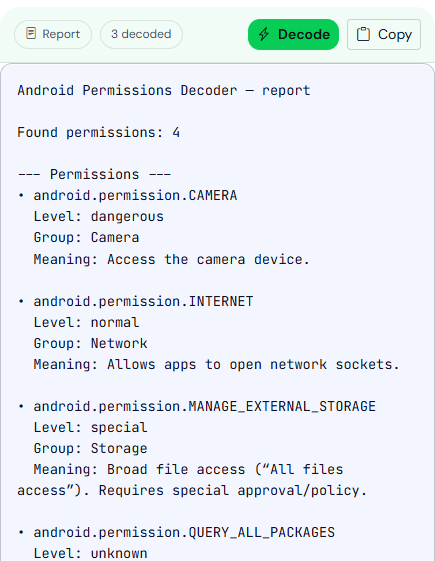
QUERY_ALL_PACKAGES is level unknown because it is not in the built-in list. This is a sample paste, not a release manifest.Search still works when the paste box is empty. Type SMS and you should see SEND_SMS, RECEIVE_SMS, and READ_SMS, all dangerous. Type a typo and you should see no matches. The search does not fuzzy-match.
Custom permissions in your own namespace are not decoded, because the matcher keeps only android.permission. and android.hardware.. That is a limit. Look those up in your own manifest comments or source. Features are listed so a required camera or telephony feature is not invisible next to the permission list. android:required="false" is not printed. The feature name is. If the feature is required, devices without that hardware will not see the app on Play. This page will not tell you the required flag. Read it in the manifest you pasted, in the source, not in the decoder report.
The report header counts how many permission names were recognized. A count equal to the number of lines you pasted is not the goal. Removing a dangerous permission you do not use is the goal. Re-paste after the merge changes. A debug manifest and a release manifest often differ by test-only permissions, and the release file is the one that matches the upload.