Three moments, and only one of them is a popup
Android does not ask about every permission the same way. The protection level decides the moment.
| Moment | What the person sees | Examples from the decoder’s table |
|---|---|---|
| Install, or first launch, with no dialog | No Allow button. The permission is granted because the app is installed. People notice these only if a scanner or a store listing mentions them. | INTERNET, ACCESS_NETWORK_STATE, VIBRATE, WAKE_LOCK, RECEIVE_BOOT_COMPLETED, FOREGROUND_SERVICE. The decoder marks these normal. |
| A system dialog at the time your code requests the permission | Allow or Don’t allow. On Android 6 through 10 the choice is while the app is in use, for the groups that existed then. Later releases add “Only this time” and split some groups. | CAMERA, RECORD_AUDIO, location, contacts, calendar, SMS, call log. POST_NOTIFICATIONS from Android 13. READ_MEDIA_IMAGES, READ_MEDIA_VIDEO, and READ_MEDIA_AUDIO from Android 13. The decoder marks these dangerous. |
| A Settings screen your app must send them to | No standard Allow dialog inside your activity. The system opens a special-access page. Many people read that page as “this app wants to take over the phone.” | MANAGE_EXTERNAL_STORAGE, SYSTEM_ALERT_WINDOW, WRITE_SETTINGS, PACKAGE_USAGE_STATS, REQUEST_INSTALL_PACKAGES. The decoder marks these special. |
The Permissions Decoder will label a pasted name with one of those three badges. It will not tell you whether your screen requested the permission at a sensible time, and it will not show you the dialog. The policy question — whether Play allows the declaration at all — is the other permissions article. Do not use this page as a list of restricted permissions.
What changed at Android 6, 11, and 13
Before Android 6 (API 23), dangerous permissions were granted at install. The user accepted them on the store page or not at all. From API 23, those permissions stay denied until the app calls the request API and the user taps Allow. An app that targets 23 or higher and still assumes the camera is available at first frame will crash or sit on a blank preview. The decoder’s dangerous badge is a reminder to find that request in code. It is not the request.
Android 11 (API 30) adds one-time grants for some permissions and tightens background location. ACCESS_BACKGROUND_LOCATION is not something you should request in the same dialog as foreground location. The platform wants a separate step. The decoder lists it as its own dangerous row. Your UI has to list it as its own step too.
Android 13 (API 33) adds POST_NOTIFICATIONS. Notifications that posted silently on Android 12 need a grant on 13 when the app targets 33. The first launch of a messaging app that asks for notifications before the user has seen a message is the dialog people talk about later. Android 13 also replaces broad storage reads with READ_MEDIA_IMAGES, READ_MEDIA_VIDEO, and READ_MEDIA_AUDIO for apps that target that release. A photo picker avoids those dialogs when you only need the user to choose a file.
The version checker is a local table you can use to confirm which release an API number refers to. API 23 is Marshmallow, API 30 is Android 11, API 33 is Android 13, API 31 is Android 12. The table stops at API 36 and starts at API 16. It does not inspect a phone.
Denial is a path, not an error
Don’t allow is a finished state. The next launch should not open the same dialog immediately. The platform also throttles repeated requests. After a second denial, or when the user has selected Don’t ask again on older releases, the only recovery is your own explanation plus a button that opens the app’s page in Settings. A loop that calls requestPermissions on every resume is what people describe as harassment, and on recent releases the dialog simply stops appearing.
Only this time means the grant dies when the app leaves the foreground or the session ends. A feature that records audio in a service after the activity closes cannot rely on a one-time microphone grant. Plan a second explanation, or a different feature, for that case.
Special access denied looks like the user backing out of Settings. Your activity gets a result that says they did not flip the switch. Treat that like Don’t allow. Do not open Settings again from onResume.
The system dialog and the screen after Don’t allow are on the device. This page does not include either shot. The decoder figure later is a pasted sample.
Ask at the feature, and say why before the system does
A dialog at first launch, before any feature is on screen, has no context. The camera dialog belongs on the screen that is about to open the camera, after a sentence of yours that says what the photo is for. The notification dialog belongs after the user has done the thing notifications are about, such as joining a chat or starting a download. Location belongs on the screen that draws a map, not on a splash screen.
Your sentence and the system dialog are two different texts. The system text is generic (“allow this app to take pictures”). Your sentence has to carry the specific reason. The decoder’s one-line meaning, such as “Access the camera device,” is the table’s gloss. It is not copy you should ship in the app, and it is not the system dialog.
Normal permissions do not get this treatment because there is no dialog. You still mention INTERNET on the Data safety form if you transmit data. That form is outside this article. People notice INTERNET only when a store listing or a scanner highlights it, which is a different audience from the runtime dialog.
A sequence you can write into a test plan
- Install a release build on a clean profile, or clear the app’s storage so grants are gone. A developer phone with old grants hides the dialog.
- Walk to the feature. Confirm your explanation is visible before the system dialog.
- Tap Don’t allow. Leave the screen and come back. Confirm you do not get an immediate second dialog, and that the feature explains how to continue without the permission.
- Open Settings, grant the permission, return. Confirm the feature proceeds without asking you to reinstall.
- On Android 13 or later, repeat for notifications as its own case if you post any. On Android 11 or later, repeat one-time allow if you request location, camera, or microphone, and then background the app.
- If the decoder marked a permission special, the test is the Settings screen, not a dialog. Record whether your button lands on the right page.
Paste the merged manifest into the decoder first so the test plan’s rows match the binary you shipped, not the permissions you remember. Unknown rows are permissions the table does not describe. Look those up before you decide the user will never see them. Some unknown names are still dangerous on the platform. The badge is not the platform.
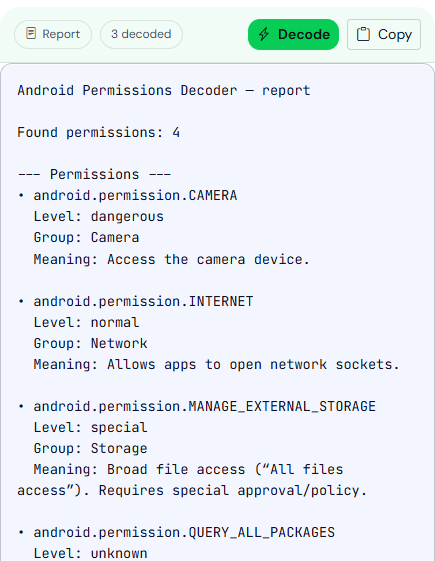
No phone run is recorded here, so no decoder row is tied to a Don’t allow tap, and no release manifest is attached to that test.
The publishing checklist includes this test as one item among signing and listings. The dialog sequence is the part a person holding the phone can actually see.