The string the form assembles
With a host filled in, the intent target is intent:// plus the host plus a path that is forced to start with /. Without a host, the target is the literal placeholder intent://<host> plus the path, so you can see the shape before you have a domain. The fragment always begins with #Intent and always ends with ;end. Fields are appended in a fixed order, separated by semicolons, and only if they are non-empty:
scheme=— defaults tohttpsif you clear it, because the script substituteshttpsfor an empty scheme.action=category=package=component=type=for a MIME type.- One extra, written as
TYPE.key=value. The type selector is the prefix (S,i,B, and the other choices in the form).;and#inside the key or the value are replaced with underscores so they cannot terminate the fragment early. A value that required a semicolon will not survive that replacement. S.browser_fallback_url=— the fallback is percent-encoded. Chrome treats that extra as the page to open when the app is missing.
The same fields produce a second line, scheme://host/path, only when the host is non-empty. That is the https or custom-scheme URL a mail client would show. The page does not request it. A 404 fallback and a host you misspelled both copy successfully.
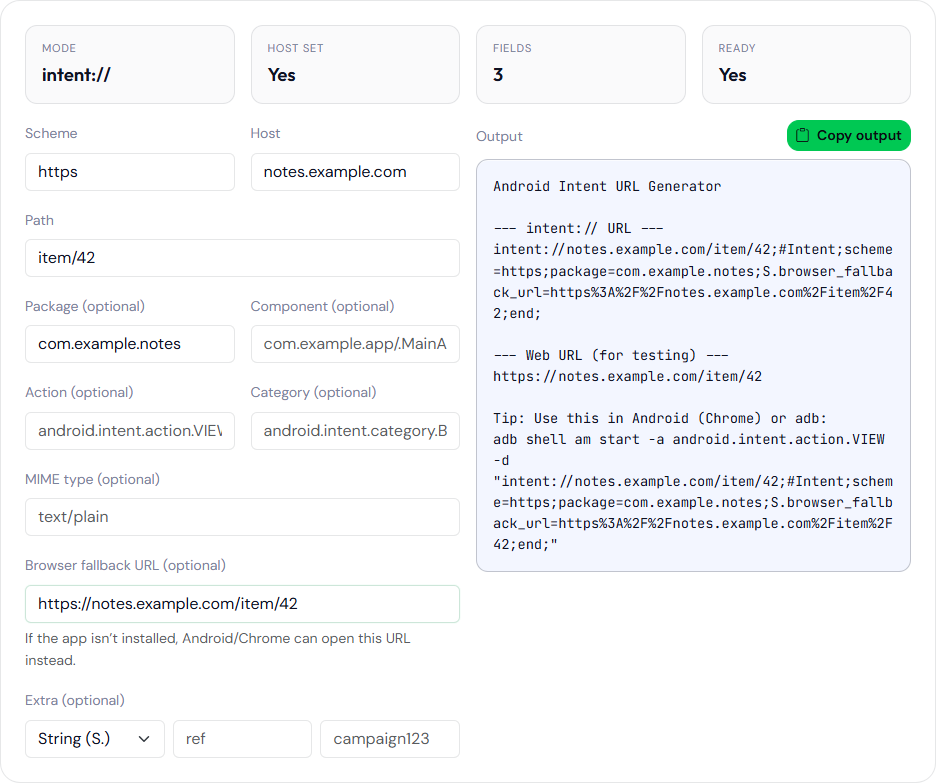
A filled example
Host notes.example.com, path item/42, scheme https, package com.example.notes, fallback https://notes.example.com/item/42. The intent line should look like:
intent://notes.example.com/item/42#Intent;scheme=https;package=com.example.notes;S.browser_fallback_url=https%3A%2F%2Fnotes.example.com%2Fitem%2F42;end
The plain line should be https://notes.example.com/item/42. Path without a leading slash still gets one. An empty path stays empty after the host, which may or may not match an intent-filter that requires a slash. The generator does not know your filter.
Package disambiguates which app Chrome should offer. It does not prove that package is installed, and it does not select the debug application id if you shipped both. Type the id that is on the device you will test.
What still has to happen on a device
Paste the plain URL into the deep-link tester if you want the matching adb shell am start -W line. Run that line yourself. Verified App Links also need assetlinks.json on the host, naming the certificate of the installed app. This form does not fetch that file and does not print a fingerprint. The test matrix, including the case where Chrome opens anyway, is in the deep-link test sheet.
An activity that receives the URL needs an intent-filter and android:exported="true" on targets of API 31 and higher. The generator will not add that attribute to a manifest. The manifest validator will not check it either.
Use the copied URL in a mail or a QR code only after a phone has opened it. A green-looking string in this form is the input to that test, not the result. If you need several extras, this form will not emit them. It keeps a single extra so the fragment stays readable. Add further S.name=value pairs in a text editor, before ;end, and then paste the whole URL into the deep-link tester so a missing ;end is caught. Do not put raw spaces in those pairs. The generator will not encode extras the way it encodes the fallback. The plain URL and the intent URL can disagree if you change the scheme after thinking of them as one link. Read both lines in the output before you copy only the first. Hosts are not lowercased or punycode-encoded here. Type the host as the intent-filter declares it. A trailing slash survives, so item/42/ and item/42 are different paths and can be different matches in the app. Empty scheme is rewritten to https before the fragment is built, so clearing the scheme field does not produce a scheme-less intent URL.