Three URL shapes, three different checks
| Shape | Example | What has to be true on the device |
|---|---|---|
| Custom scheme | notes://item/42 | An activity with that scheme in an intent-filter, exported, and no other app chosen as the handler. Another app can register the same scheme. |
| https App Link | https://notes.example.com/item/42 | The filter matches host and path, and assetlinks.json verifies the package and the signing certificate. Without verification, Android shows a chooser or opens the browser. |
| intent:// | intent://item/42#Intent;scheme=notes;package=com.example.notes;end | Chrome and other apps parse the fragment. package disambiguates. S.browser_fallback_url is where you go if the app is missing. The fragment must contain #Intent and end with ;end. |
The Deep Link Tester accepts one URL per line. For a normal URL it uses the browser’s URL parser. It records scheme, host, and path. An http or https URL with no host is marked not OK. An http URL that does have a host stays marked OK and adds the tip “prefer https for production App Links.” Whitespace or control characters mark the line not OK. The page does not request the host, so it cannot see a redirect, a 404, or a certificate error.
For a line that starts with intent://, the tester requires #Intent and warns if ;end is missing. It reads package, scheme, action, and extras whose keys start with S., B., i., or l.. It does not open Chrome.
Every OK or not-OK line gets the same adb skeleton:
adb shell am start -W -a android.intent.action.VIEW -d 'THE_URL'
The command does not pass -p with a package name, even if the intent URL contained one. -W waits for the launch to finish and prints the activity that started, which is the useful part when you run it yourself. The tester does not run adb.
Fill a matrix before you print a QR code
Rows are entry points. Columns are the app state. A minimal matrix:
| Entry | App installed, verified | App installed, verification off or failing | App not installed |
|---|---|---|---|
| https link tapped in Gmail or another app | Opens the activity. am start -W shows that component. | Chooser or browser. This is the usual “stuck in Chrome” case. | Browser. The page should offer an install, not a dead end. |
| Same https link typed in Chrome’s bar | May still open the app if verified. Chrome’s behavior is not identical to a tap in Gmail. | Stays in Chrome. | Stays in Chrome. |
| Custom scheme | Opens the app if the filter matches. | Scheme links do not use assetlinks. A mismatch here is the filter, not the JSON file. | The link does nothing useful unless you wrapped it in intent:// with a fallback. |
| intent:// with package and fallback | Opens the named package if the filter matches the scheme and path. | Same, because the package is explicit. Verification is a separate https question. | Falls back to S.browser_fallback_url when the caller honors it. |
Add a row for “user has chosen Chrome as the default for this host.” Clearing that default is part of the test. Add a row for a path the filter does not list. A typo in android:pathPrefix sends a well-formed URL to the browser. The tester will mark the URL OK, because the URL is OK. The manifest is wrong.
Run adb am start -W on a device that has your activity installed, and keep the Activity line with the release note. The figure below is the syntax table for the sample lines. No package was launched for this page.
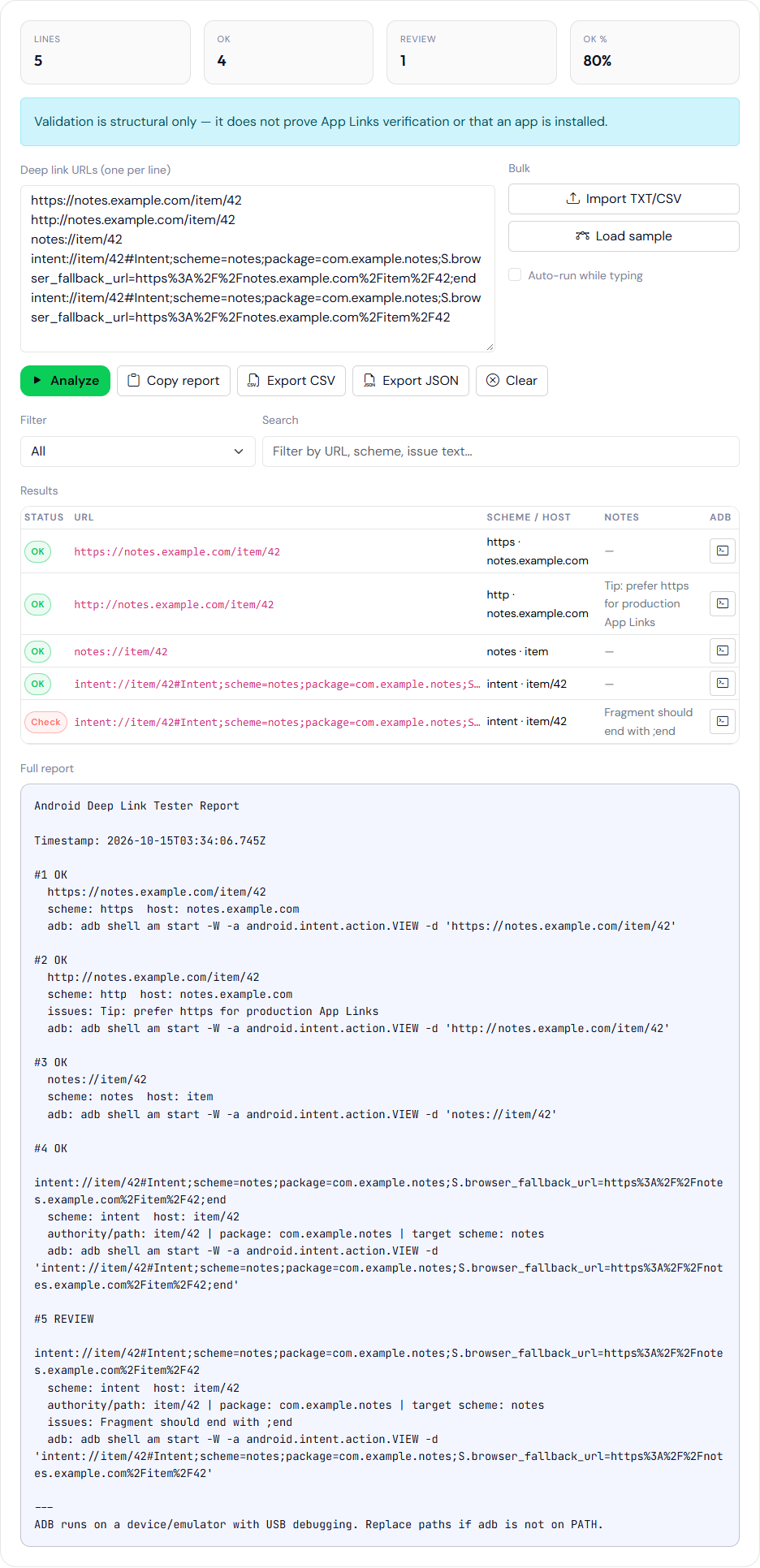
;end removed. The http row is OK and shows the https tip. The last row is marked for review. No device was attached.Four lines to paste into the tester
https://notes.example.com/item/42
http://notes.example.com/item/42
notes://item/42
intent://item/42#Intent;scheme=notes;package=com.example.notes;S.browser_fallback_url=https%3A%2F%2Fnotes.example.com%2Fitem%2F42;end
Expect the https line to be OK with host notes.example.com. Expect the http line to be OK with the https tip. Expect the custom scheme to be OK if the parser accepts it. Expect the intent line to be OK and the notes column to mention the package and the target scheme. Delete ;end and the same line should be marked for review.
The Intent URL Generator builds that fourth shape from fields: host, path, scheme, package, action, category, component, mime type, one extra, and a fallback. Fallback is encoded and stored as S.browser_fallback_url. The fragment is joined with semicolons and ends with end. The generator also prints a plain scheme://host/path URL. It does not check that the host exists. It does not talk to a device. Extras strip ; and # out of the key and value so they cannot break the fragment. That replacement means a value that needed a semicolon will not round-trip. Put complex values through a documented encoding before you rely on them.
Digital Asset Links, which neither tool fetches
Verified https App Links need https://HOST/.well-known/assetlinks.json served as JSON, without a redirect to another host. The file lists the package name and the SHA-256 of the signing certificate. The certificate that matters is the one on the installed APK. With Play App Signing, that is the app signing certificate, not the upload key, unless they are the same key. A file that names the upload certificate will fail verification on Play-delivered builds. The certificate topic is in desk hash versus the installed APK.
Play Console’s App Links assistant and adb shell pm get-app-links com.example.notes tell you the verification state on a device. The tester does not run pm. A green row in the browser is not a verified link.
The activity that receives the link still needs android:exported="true" because it has an intent-filter. The manifest validator does not check that attribute. Details are in exported components after Android 12.
Fallback is a page, not a flag
When the app is absent, the https URL should render a page that explains the content and links to the store listing. A 404 trains the person who tapped a campaign to ignore the next one. S.browser_fallback_url should point at that page, not at a login wall that assumes the app already opened. The generator will happily emit a fallback that 404s. Fetch it yourself.
Query parameters and empty paths need their own rows. A filter on /item/ does not match /item without a trailing slash, depending on how pathPrefix and path are written. The tester’s path column shows what you typed. It does not show what your filter accepts.
path, pathPrefix, and pathPattern are not the tester’s job
A filter can use android:path, android:pathPrefix, or android:pathPattern. path is exact. pathPrefix matches a leading string, so /item also matches /item/42 and /items if you forget the trailing slash you meant as a boundary. pathPattern uses a small glob: .* is the usual “rest of the path,” and a literal dot is escaped. The tester shows the path you typed, including the query string, because it stores pathname + search + hash. It does not evaluate a pattern from your manifest. Put the pattern and three URLs — one that should match, one that shares a prefix but should not, and one with an empty query — in the test matrix, and decide the match from am start -W, not from the OK badge.
Write the matrix down next to the release: URL, expected component, result of am start -W, result of a tap in Gmail, result with the app uninstalled. The browser tools only help you prepare the strings you paste into that matrix.