Put the three fields in one row
| Field | Who reads it | What a collision looks like |
|---|---|---|
versionCode | Play, package manager. An integer. Users do not see it in the store listing. | The upload is rejected because the integer is not higher than one already used for that application id, including other tracks. |
versionName | Store listing and the system App info screen. A string. | No uniqueness check. You can ship 1.0.0 on every release. You can also ship 2.4.0 while the integer goes backwards, and Play will still reject the integer. |
applicationId | Play listing identity and the installed package name. | A suffix such as .staging is a different app. The production listing will not accept it as an update, and it will not explain the failure as “flavor suffix.” |
Since Android Gradle Plugin 8, namespace is the package used for the R class and the source manifest’s package attribute. It is not the Play identity. Changing namespace to tidy up Java packages does not move an existing listing. Changing applicationId creates a new listing. Installed users do not receive that build as an update.
The text package attribute in a source AndroidManifest.xml can therefore disagree with the id Play has on file. The Manifest Validator checks that the attribute looks like a dotted name. It does not ask Play whether that name is the listing you intend to update.
A failure log, not a story
These three builds are a worked example with made-up coordinates. They are not a log from a release published here. Use the shape when you compare two artifacts.
| Build A, previous upload | Build B, candidate | Build C, staging flavor | |
|---|---|---|---|
| applicationId | com.example.notes | com.example.notes | com.example.notes.staging |
| versionCode | 24003 | 24003 | 1 |
| versionName | 2.4.0 | 2.4.1 | 2.4.1-staging |
| File SHA-256 | differs | differs | differs |
| What Play does | Already on the track | Rejects. The integer was reused. The new versionName does not save it. | Not an update to the production listing. The low integer is legal on a different id. |
Build B is the case people debug as a signing problem because the file is new and the hash changed. The hash should change. The integer did not. Build C is the case people debug as “versionCode too low” while looking at the production track. The production track has never seen com.example.notes.staging.
An aapt dump badging line for Build A looks like this:
package: name='com.example.notes' versionCode='24003' versionName='2.4.0'
If that line and the Play listing disagree, trust aapt on the file you are holding and then find out why Gradle emitted it. Do not edit the string in a decompiled manifest and call the APK published.
What the browser can show you
Drop the APK on the APK Analyzer. The report hashes the whole file with crypto.subtle.digest('SHA-256'). It then asks JSZip for the entry list, counts names ending in .dex, and scans printable ASCII in AndroidManifest.xml for package=, versionName, and versionCode. When those strings survive in the binary XML, they show up as “Possible package,” “Possible versionName,” and “Possible versionCode.” When they do not, the report says the obvious strings were not found. That sentence means the heuristic failed. It does not mean the APK has no version.
Compare two drops by hash first. If Build A and Build B have the same hash, you are looking at one file renamed. If the hashes differ and the possible versionCode is the same number, you have a candidate for the reused-integer rejection, still subject to aapt confirmation. The analyzer will not tell you the highest code already on the internal testing track. That number lives in Play Console.
The page does not open .aab files as APKs. A bundle renamed to .apk may fail the ZIP parse or may open with a layout that is not an installable APK. Produce APKs with bundletool when you need a local file to drop. See what a browser ZIP listing can see.
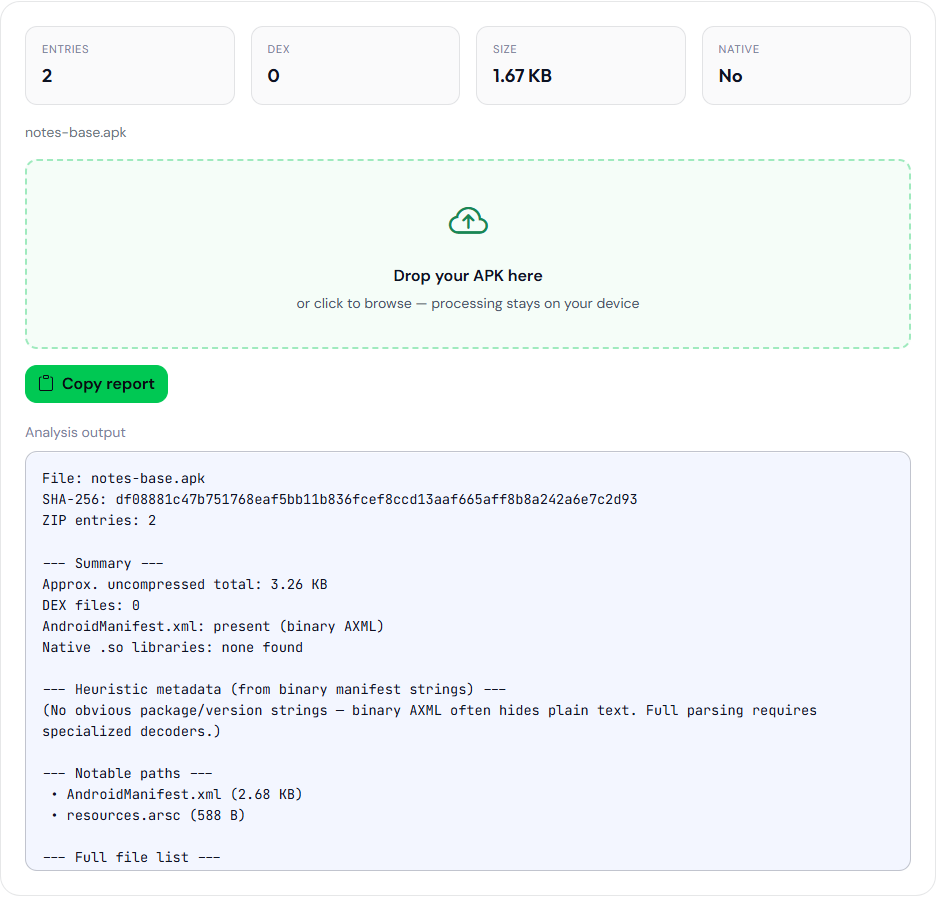
notes-base.apk. SHA-256 df08881c47b751768eaf5bb11b836fcef8ccd13aaf665aff8b8a242a6e7c2d93. Heuristic blank.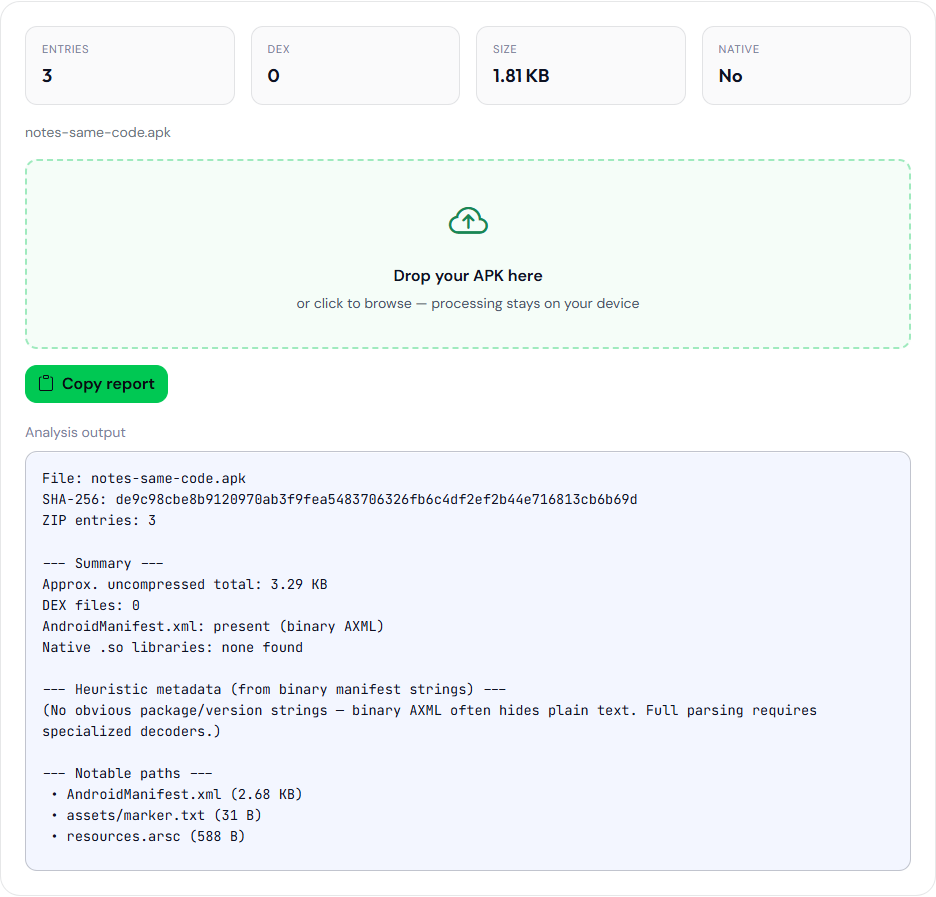
notes-same-code.apk, the same sample plus assets/marker.txt. SHA-256 de9c98cbe8b9120970ab3f9fea5483706326fb6c4df2ef2b44e716813cb6b69d. The heuristic is blank on this file too, so the page does not show a shared versionCode guess. aapt dump badging prints versionCode 24003 for both.Keep the Play Console rejection text, with the account name removed, next to the versionCode you uploaded. The figures above are the sample APKs. aapt dump badging printed versionCode 24003 for both, and the analyzer heuristic was blank.
Where Gradle writes each value
versionCode and versionName are usually in the app module defaultConfig, or in a version.properties file a CI job reads before it calls Gradle. Product flavors and build types can override either value. applicationIdSuffix on a build type appends to the id. A debug build of com.example.notes with suffix .debug installs beside the release build and does not consume the production versionCode. It also does not tell you what the next production integer should be.
A version code derived from git rev-list --count collapses on a shallow clone. The job can emit 1 or another small integer that was legal years ago and is not legal on the current track. Fail the job when the integer is not greater than the integer stored next to the previous release tag. Store the whole-file SHA-256 beside that tag so a later question about “which APK did QA sideload” has an answer other than a filename.
Splits and universal APKs generated from one bundle share one versionCode. Bumping the integer in one split and not the others produces a set that does not describe a single release. Play’s upload of an Android App Bundle carries one code for the bundle.
Tracks spend integers
Internal testing, closed testing, open testing, and production are not four independent counters you can reset by ignoring a track. A code used on an internal track is often unavailable for production later. A halted rollout still occupies the integer. Replacing a bad build means a higher code, not a re-upload of the same code with a new versionName.
The Android version checker is unrelated to this integer. It is a local table of Android releases from API 16 through API 36. It will not tell you your app’s versionCode. Use it when someone says “API 34” and you need the platform version name, not when an upload is rejected.
Checks before you spend an upload
- Read
applicationIdfrom the Gradle module that produces the artifact, including suffixes. - Read
versionCodefrom that same variant. Compare it with the highest code shown on every track in Play Console for that exact application id. - Read
versionNameonly as the string users will see. Do not use it as the uniqueness check. - Confirm with
aapt dump badgingon the file you will upload. If you only have an APK and no source, the analyzer’s heuristic is a hint and aapt is the confirmation. - Record the SHA-256 of the file you uploaded. The file testers install from Play can be a different byte stream after Play App Signing. That difference is explained in desk hash versus the installed hash. It does not excuse a reused versionCode.
Integer limits and the name people search for
versionCode is a positive integer. The platform documents an upper bound of 2100000000. A scheme that uses a timestamp in milliseconds will pass that bound and the build will not be a legal code. A scheme that uses yyMMddHH fits, and it also collides if two builds are produced in the same hour. Prefer a counter you increment on purpose over a clock. The counter still has to be higher than every code Play has already accepted for that application id, not merely higher than the number in the last git tag if a hotfix was uploaded from another branch.
versionName has no integer limit because it is not an integer. 2.4.0 and 2.4 and 2.4.0-rc1 are all legal strings. None of them sort the way a human expects inside a string sort, and Play does not sort updates by that string. If a crash report shows only the marketing string, you cannot tell build 24003 from 24004. Put the integer in the report, or in a hidden about screen, if you need the crash to name the artifact.
The rest of a release afternoon is the publishing checklist. This page is only the identity row.