Text in, a report out
Paste XML or choose a text file. The validator runs DOMParser in the tab. If the parser returns a parsererror, the report says the document is not valid XML. Binary AndroidManifest.xml from an APK is not valid XML. Save apktool’s decoded file, or the merged manifest from Gradle, and paste that. Do not paste the APK.
On a document that parses, the script collects issues and warnings. Issues are the lines that start the failure list. Warnings are printed after them. A file with warnings and no issues gets “No critical issues found.” That sentence means this checklist passed. It does not mean the app installs on Android 12, and it does not mean Play will accept the package name.
Issues versus warnings
| Finding | Level | Rule in this script |
|---|---|---|
Root element must be manifest | Issue | The document element’s tag name is checked and nothing else is trusted if it is wrong. |
Missing manifest package | Issue | The attribute is required by this checker. Gradle’s namespace may be what generated it. The checker does not call Gradle. |
Missing application | Issue | No application element in the document. |
| Package does not look like an application id | Warning | The pattern requires two or more dot-separated segments, each starting with a letter or underscore. com.example.notes passes. A single token fails the warning. |
Missing xmlns:android | Warning | The namespace declaration is recommended by this checker. It looks only at the manifest element, for xmlns:android equal to the Android resource namespace. A declaration on some other element does not count. |
Missing uses-sdk or minSdkVersion | Warning | Recommended here. The numeric value is not compared with Play’s target-API deadline. |
uses-permission without android:name | Warning | The index of the empty element is included. The name is not looked up in the permission table. That is the decoder. |
| No launcher activity | Warning | No activity whose intent-filter has both android.intent.action.MAIN and android.intent.category.LAUNCHER. Libraries and some TV or auto apps will see this warning and be fine. |
android:exported is not in the table because the script never reads it. A launcher activity with a filter and no exported value can produce “No critical issues found” and still fail install on API 31 and higher. Read the exported-attribute article before you treat a pass as an install test.
Sample that should pass this checker and still be incomplete
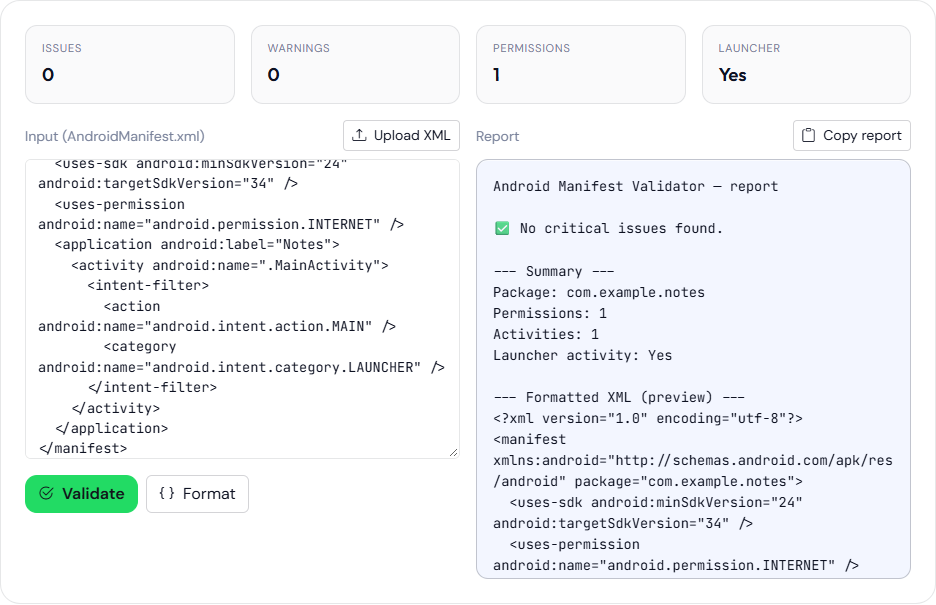
<manifest xmlns:android="http://schemas.android.com/apk/res/android" package="com.example.notes">
  <uses-sdk android:minSdkVersion="24" android:targetSdkVersion="34" />
  <uses-permission android:name="android.permission.INTERNET" />
  <application android:label="Notes">
    <activity android:name=".MainActivity">
      <intent-filter>
        <action android:name="android.intent.action.MAIN" />
        <category android:name="android.intent.category.LAUNCHER" />
      </intent-filter>
    </activity>
  </application>
</manifest>
Expect package com.example.notes, one permission, one activity, launcher yes, and no issue from this page. The activity is still missing android:exported. Add android:exported="true" on that activity if this file targets API 31 or higher, then paste again. The report will look almost the same. The install behavior will not.
The summary counts permissions and activities by tag name. It does not list the permission strings. Copy those into the decoder when you want badges. Pretty-printed XML in the report is the text you pasted, reformatted. It is safe to read and unsafe to treat as the merged manifest unless that is what you pasted.
android:exported. This is a sample manifest, not a merged release manifest.Target and min SDK numbers in the sample are not checked against the version table. API 24 is Android 7.0 and API 34 is Android 14 in that table. The validator does not print those names. It also does not read android:debuggable, android:allowBackup, or queries. A debuggable release can pass this page. Confirm debuggable with aapt dump badging before you upload. The publishing list that includes that confirmation is the checklist. Pretty-print only indents the text already in the box. It will not insert android:exported for you. Pasting src/main/AndroidManifest.xml skips library and build-type lines. The merged manifest is not the XML you pasted. This page is not an editor. Change the text elsewhere, then check it here.