A table, not a probe
The data is an array in the page script. Search compares your text with the version string, the codename, the API number, and the notes. A minimum-API control hides rows below that number. There is no call to read navigator.userAgent, no adb, and no lookup of the phone you are holding. If you need the API level of a connected device, run adb shell getprop ro.build.version.sdk. The ADB generator can print a getprop line. This page will not.
The table starts at Android 4.1 Jelly Bean, API 16, and ends at Android 16, API 36, codename Baklava, release year 2025 in the row. Android 15 is API 35. Android 14 is API 34. Android 13 is API 33. Android 12 is API 31 and 12L is API 32. There is no API 37 row. A search for 37 should show nothing. That means the table has not been extended, not that the API does not exist. Check the date on this page and the Android release notes when you are targeting something newer than 36.
What each column is for
Version is the platform version users see in Settings, with the oddities kept as their own rows: 8.0 and 8.1, 7.0 and 7.1, 5.0 and 5.1, 12 and 12L, 4.4 and 4.4W. Codename is the dessert name used in the platform docs. API is the integer you put in minSdkVersion and targetSdkVersion. Release is a year, not a day. Notes are one line about a platform change that is easy to confuse with an app setting: runtime permissions on API 23, notification channels on API 26, scoped storage on API 30, notification permission on API 33, foreground-service policy on API 34.
Those notes are memory aids. They are not the behavior-change document, and they are not a statement that your app is affected. API 23 in the table does not read your manifest. Paste minSdkVersion into the manifest validator if you want a presence check. The validator will not tell you that 23 is Marshmallow. This page will.
Lookups that come up next to a manifest
- You see
minSdkVersion="24". Search 24. The row is Android 7.0 Nougat. You are not supporting Marshmallow. Runtime permissions still apply, because 24 is above 23. - You see a target of 31. That is Android 12, the release that requires
android:exportedon filtered components. The version row will not inspect your XML. The article that does explain the attribute is exported components after Android 12. - You see
POST_NOTIFICATIONSin a permission paste and someone asks “which phones.” Search 33. Android 13 is the release that adds that runtime permission for apps targeting it. The permission meanings stay on the decoder. - You see API 32 in a bug report. That is 12L, the large-screen release, not “Android 12” as API 31 and not Android 13. Quote the row so the bug report stops saying “Android 12” for three different numbers.
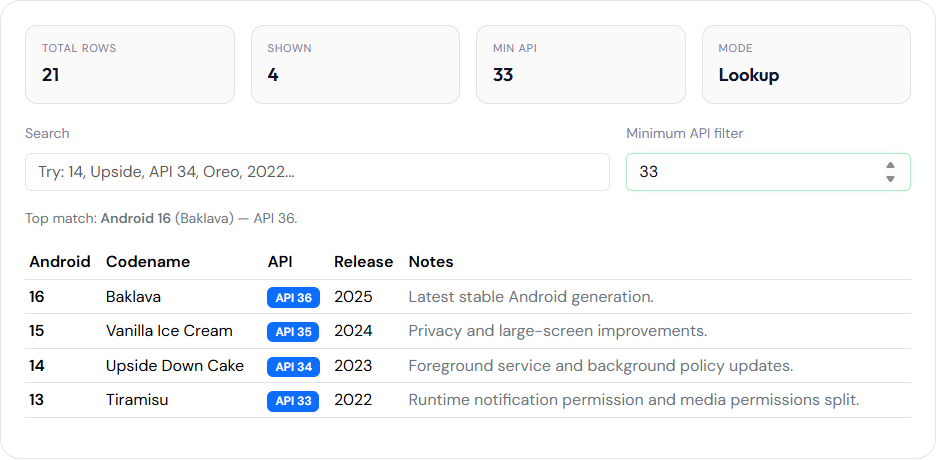
Play’s requirement for the target API you must upload is a Play Console rule that changes on Google’s calendar. It is not a row in this array. Use the table to translate the number Play names. Use Play Console to know whether your bundle meets the current deadline. The publishing list that points at both is the checklist. Search is a substring over the version, the codename, the API number, the year, and the note. “Tiramisu” or “33” finds Android 13. The phrase “Android 13” does not, because the row stores 13, not those two words. “notification” matches more than one row, including API 26 (channels) and API 33 (the runtime permission). Read the API cell before you copy a number into a manifest. The minimum-API box hides older rows. It does not change what your app’s minSdk is. Clear it when a search suddenly returns no rows and you are sure the codename exists. API 20 is the Wear row (4.4W), not a phone release between KitKat and Lollipop. Do not copy 20 into a phone app’s minSdk just because a KitKat search showed that row.