One line in, one row out
Paste URLs separated by line breaks. Blank lines are reported as empty. For every other line the script builds a row: a status, the original string (truncated in the table at 64 characters), the scheme and host, any notes, and an adb command.
A line that contains whitespace or control characters is not OK. Encode spaces as %20 before you trust the row. A line that starts with intent:// is parsed as an intent URL. Anything else is given to the browser’s URL constructor. If that throws, the row is “not a valid URL” and there is no host.
Rules that change the status
- intent:// without
#Intent. Not OK. Chrome’s intent URLs need that fragment. - Fragment without
;end. Not OK. The note still tries to readpackage,scheme,action, and extras prefixedS.,B.,i., orl.. - http or https with an empty host. Not OK.
- http with a host. Stays OK, and the issues column gets “prefer https for production App Links.” The tip is not a failure. Filters can still match http. Verification for App Links is an https practice, not a parser error.
- Custom schemes such as
notes://item/42are standard URLs if the constructor accepts them. OK does not mean an activity is registered fornotes.
The adb column is always the same shape when the line was analyzed, including some rows that are not OK:
adb shell am start -W -a android.intent.action.VIEW -d 'URL'
Single quotes wrap the URL when it contains no single quote. There is no -p package argument, even if an intent URL named a package. -W is what makes adb print the activity that actually started, after you run the line on a computer that has a device. This page does not run it. It also does not request the URL, so it cannot see redirects. A short link that 302s to a different host can be marked OK here and miss the intent-filter after the redirect.
You can filter the table to OK or to rows that need review, and you can search the text of the row. A report download is the text of those rows. It is not a device log.
Four lines and the row you should expect
https://notes.example.com/item/42
http://notes.example.com/item/42
notes://item/42
intent://item/42#Intent;scheme=notes;package=com.example.notes;end
The first row is OK, scheme https, host notes.example.com. The second is OK with the https tip. The third is OK if it parses, scheme notes, host item — the constructor treats item as the host when the URL is written that way. If you meant a path, write notes:///item/42 or notes://notes.example.com/item/42 and look at the host column again. The fourth is OK, and the notes should mention the package and the target scheme. Remove ;end and that fourth row should leave the OK state.
That host quirk on custom schemes is why the table exists. A URL can be valid and still not be the URL your filter describes.
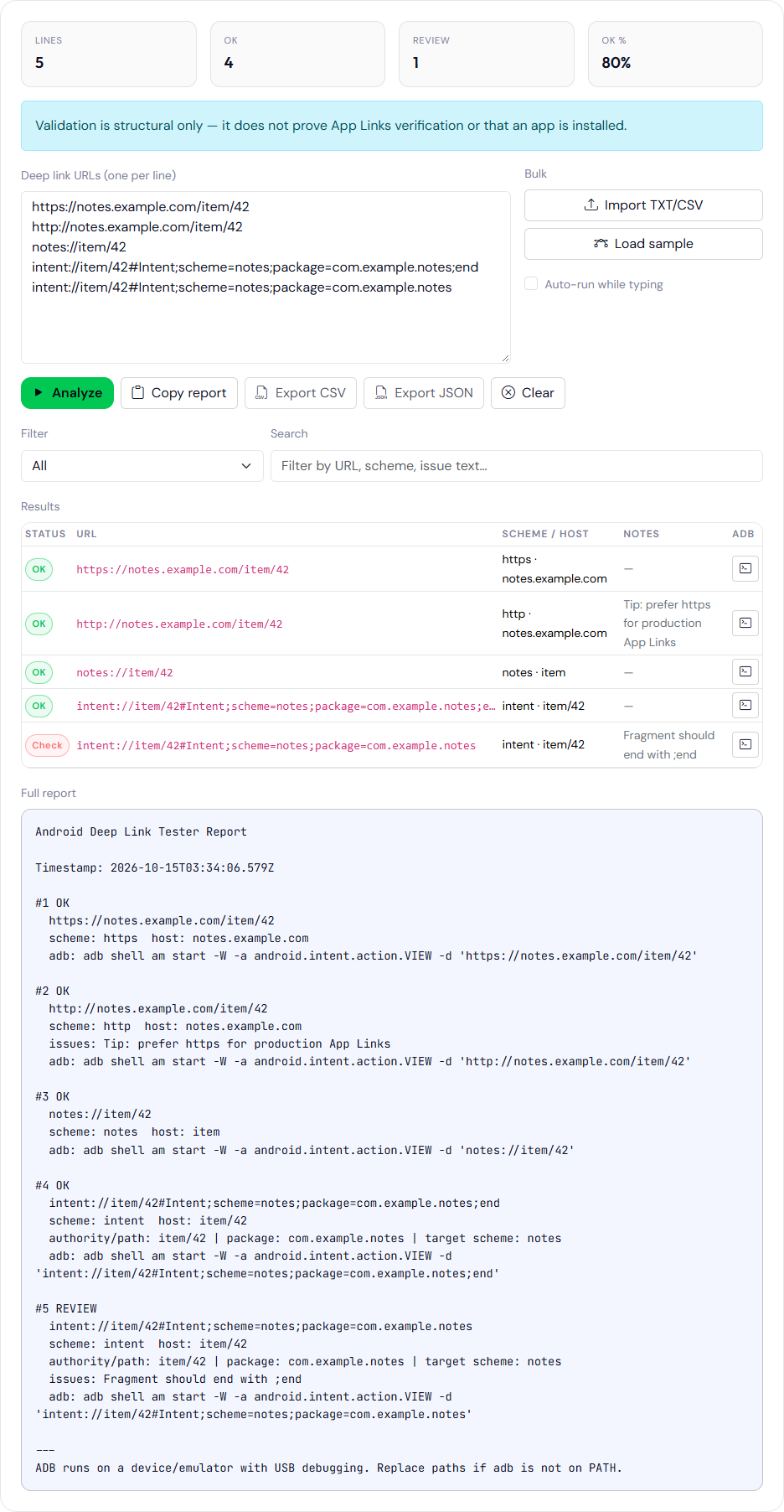
;end removed. The http row stays OK and carries the https tip. The fifth row is the missing-end warning. These hosts were not contacted, and adb was not run.Copy the adb line from the report and read the Activity line on a phone that has your package installed. The capture above is the syntax table. adb was not run.
Build the intent URL on the intent URL generator if you do not want to type the fragment by hand. The meaning of a pass or a fail on a phone, including assetlinks, is the test sheet. This page stops at the string. The sample and import controls only fill the text area. They do not check a live campaign. Clear the area before you paste a list from a spreadsheet so a sample URL does not end up in the report you file with the release. Rows marked OK with an issues tip, such as the http note, still produce an adb line. Run the https line when that is the URL you will actually publish. The on-page report lists every pasted line. The status filter only changes the table, not that report. Quote the adb line from the report when you file the test, so the command and the URL stay together.