The page prints a string
Every action goes through the same prefix. The command starts with adb. If the serial box is non-empty, -s and that serial are inserted next. The rest depends on the action you picked. Copy puts that string on the clipboard. Nothing listens on a USB port, and nothing is sent to droidxp.com with the fields.
Quoting is mechanical. An argument that contains a space, a tab, a newline, or a quote is wrapped in double quotes, and double quotes inside it are backslash-escaped. An empty argument becomes "". Placeholders such as <path-to-app.apk> and com.example.app are ordinary text so the line is syntactically shaped like adb even before you have a path. Replace them. Running the placeholder will fail, which is better than running a path you did not choose.
Actions and the exact flags
- devices —
adb devicesoradb devices -l. - install —
adb install, then-rif replace is checked, then-gif grant is checked, then the path.-ggrants runtime permissions and skips the dialogs you may be trying to test. - uninstall —
adb uninstalland-konly when keep-data is checked. - clear —
adb shell pm clear PACKAGE. This deletes app data. - force-stop —
adb shell am force-stop PACKAGE. - start activity —
adb shell am start -n PKG/ACTIVITYand, if you filled data,-d URI. Default component text iscom.example.app/.MainActivity. - logcat — with clear checked, only
adb logcat -c. With a tag,adb logcat Tag:LEVEL *:S. Otherwiseadb logcatand the level, defaulting to*:V. - shell —
adb shellplus the text you typed, or the placeholder<command>. - input text — spaces become
%s. Default sampleHello%sworld. - keyevent — the named code if present, otherwise the number, otherwise
KEYCODE_HOME. - tap —
input tap X Y, default 540 1200. swipe — four coordinates and a duration only if you typed one. - forward / reverse / tcpip / connect / disconnect — the matching adb verb and the host or port fields, with the defaults shown in the form until you change them.
- screenrecord — a
screenrecord --time-limitline and a separatepull. screencap — anexec-out screencap -predirect and a pull. - push / pull / getprop / pm list / reboot — those verbs, with
-3and-fon package list only when the boxes are checked. Reboot adds a mode only when one is selected.
A full session that uses install and am start against a real serial is written out in build the command here, run it on the phone. Deep-link VIEW intents are a different generator: the deep-link tester always prints am start -W -a android.intent.action.VIEW, which this form’s start-activity action does not.
One line, explained
Serial emulator-5554, install checked for replace, grant unchecked, path C:\builds\app-debug.apk. The copy buffer should be:
adb -s emulator-5554 install -r "C:\builds\app-debug.apk"
That path has no spaces, so the quoting rule leaves it unquoted. Use a path that contains a space, such as C:\builds\My Builds\app-debug.apk, and the same rule wraps the path in double quotes. Run the line only after adb devices shows that serial as device, not unauthorized.
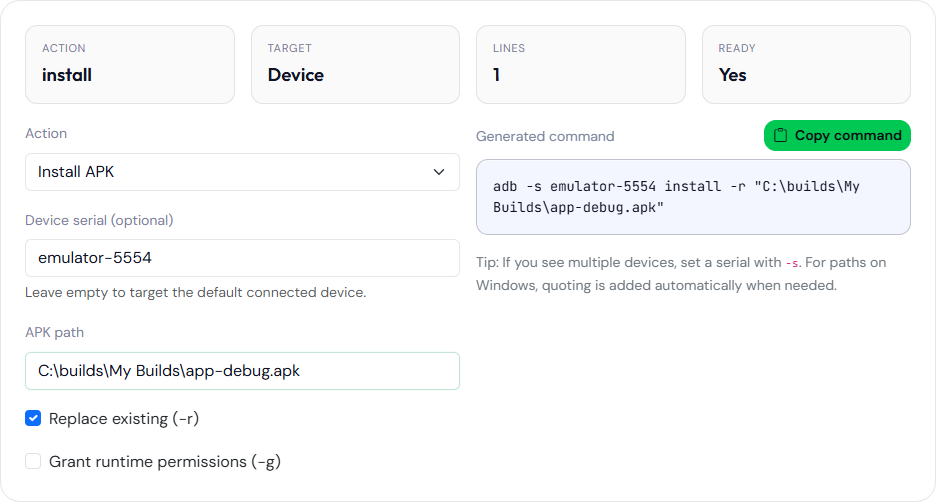
emulator-5554 and the path were typed into the form. The path contains a space, so the generator added double quotes. No device was attached when this was captured. The page did not run adb.The form will also print adb reboot. Read the line before you paste it into a terminal that has a production phone attached. The page does not add a confirmation step. You are the confirmation step. The same caution applies to pm clear and to adb shell with a command you typed in a hurry. The generator’s job ends when the string is on the clipboard. History in your terminal is where the command actually ran, and that history is a better audit than a screenshot of this form, because the form can be edited after you ran something else. If two devices are connected, a line without -s is the line adb will refuse. Put the serial in the box and copy again rather than adding -s by hand and forgetting it on the next action. The serial is a device id from adb devices, not an API level and not an application id.