Published · Updated · 6 min read
Build adb and intent commands in the browser, then run them yourself
These pages assemble command text. Platform-tools and a phone execute it. A parsed URL is not a working link, and a copied adb line is not an install.
What you need on the machine that will run the command
Install Android platform-tools and confirm adb version works in the terminal you actually use. Enable USB debugging on the phone, or connect to an emulator. The ADB command generator cannot see that setup. It has a serial field. If you type a serial, every command is prefixed with adb -s SERIAL. If you leave it blank, the command is adb … and adb itself applies the usual rule: one device, or an error that tells you to pick one.
Arguments that contain spaces or quotes are wrapped in double quotes by the generator, with inner double quotes escaped. Empty optional paths become placeholders such as <path-to-app.apk> or com.example.app. Replace those before you run the line. The page will copy a placeholder if you click copy. That is intentional. It is not a guess about your project.
A session that starts with devices and ends with a process
Use the form in this order. Each bullet is an action the script knows how to print.
- devices.
adb devices, oradb devices -lif you check the long flag.-ladds model and product, which is how you tell two phones apart before you set a serial. - install.
adb installplus-rif you check replace, plus-gif you check grant-all-runtime-permissions, plus the path.-ggrants runtime permissions so you can test a feature without tapping dialogs. It also hides the dialog. Turn it off when you are testing the dialog. See when the dialog appears. - start activity.
adb shell am start -n package/activitywith an optional-d URI. The default component text iscom.example.app/.MainActivity. A leading dot is relative to the package. If install used a debug application id, this package must be the debug id, not the production id. The generator does not look up either id. - force-stop and clear.
adb shell am force-stop packageandadb shell pm clear package. Clear deletes app data. Do not point it at a package whose data you needed. - logcat. With a tag, the line is
adb logcat Tag:LEVEL *:S, which shows that tag and silences the rest. Without a tag, it printsadb logcat *:Vor the level you picked. The clear checkbox printsadb logcat -cinstead, which wipes the buffer and does not stream.
Uninstall is adb uninstall with optional -k to keep data. The package defaults to com.example.app until you replace it.
Input, ports, and files
The same form prints device-side input and file commands. They are easy to run against the wrong window, so read them before you paste.
- input text. Spaces in your text are rewritten as
%s, which is whatadb shell input textexpects. The default sample isHello%sworld. This types into whatever is focused on the device. - keyevent.
adb shell input keyeventplus a name such asKEYCODE_HOMEor a numeric code, whichever field you filled. The name wins if both are set. - tap and swipe. Coordinates in pixels. Defaults are a tap at 540,1200 and a swipe that moves horizontally. A duration is appended only if you type one. Coordinates depend on the panel’s resolution and orientation. They are not density-independent pixels.
- forward and reverse.
adb forward tcp:9222 tcp:9222andadb reverse tcp:8081 tcp:8081unless you change the ports. Reverse is the usual way a device reaches a dev server on the computer. - tcpip and connect.
adb tcpip 5555andadb connect 192.168.1.50:5555. The host is a placeholder until you type the phone’s address. Disconnect printsadb disconnectwith a host only if you supplied one. - screencap and screenrecord. Screencap prints an
exec-out screencap -predirect and apull. Screenrecord printsadb shell screenrecord --time-limit SECONDS PATHand then a pull. The default remote path is/sdcard/demo.mp4and the default limit is 30 seconds. Recording stops at the limit. It does not open a player. - push, pull, getprop, pm list, reboot. Push and pull use the paths you type, or a
./file.txtand/sdcard/Download/style default.pm list packagescan add-3for third-party apps and-ffor APK paths, plus a filter string. Reboot appends a mode only if you selected one. getprop appends a key only if you typed one.
Shell is a free-text action: adb shell plus whatever you typed. The generator does not check that the remote command exists.
Intent URLs are a second page
Deep links are not the start-activity action above, though you can paste a URI into that action’s data field. Two dedicated pages exist because the URL grammar is its own problem.
The Intent URL Generator builds intent://host/path#Intent;scheme=…;package=…;end and a plain scheme://host/path URL. Fallback becomes S.browser_fallback_url with the value percent-encoded. One extra is emitted as TYPE.key=value after ; and # are replaced in the key and value. The page does not contact the host.
The Deep Link Tester parses a list of URLs and prints:
adb shell am start -W -a android.intent.action.VIEW -d 'https://notes.example.com/item/42'
Run that on a machine with a device attached. -W waits and prints the activity that handled the view. If the activity is a browser, the filter or the App Link verification did not pick your app. The tester cannot see that. The test matrix is in the deep-link test sheet.
A debug install and a release install are different packages when applicationIdSuffix is set. The package= field in an intent URL and the component in am start -n must name the package that is actually installed. The generator will not warn you that you typed the production id while the phone has the debug build.
A concrete handoff
Computer serial from adb devices -l is emulator-5554. The debug id is com.example.notes.debug. The activity is .MainActivity. The link you want to try is https://notes.example.com/item/42. The lines to run, which you can assemble on the two pages and then edit, are:
adb -s emulator-5554 install -r app-debug.apk
adb -s emulator-5554 shell am start -n com.example.notes.debug/.MainActivity
adb -s emulator-5554 shell am start -W -a android.intent.action.VIEW -d 'https://notes.example.com/item/42'
Read the Activity line from the third command. Then tap the same URL from Gmail on that emulator. The two results are allowed to differ. Write both down.
The figures below are the command text the generator printed. No device was attached for those lines, so this page has no Activity line and no mail-app result. Read both on your emulator.
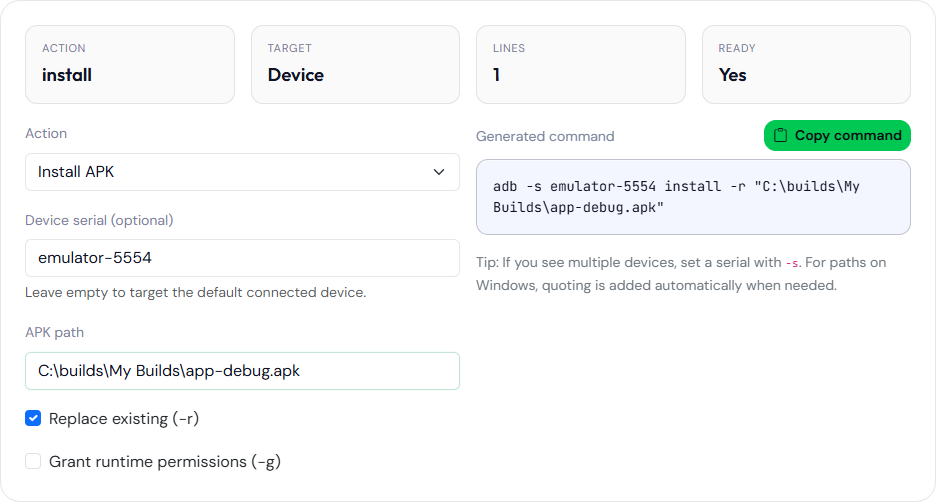
-r. The serial and the path were typed into the form. No device was attached.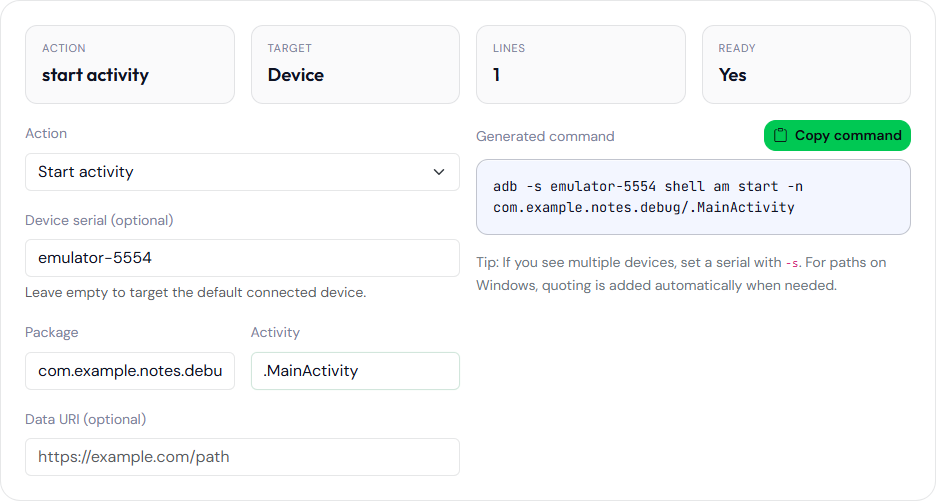
com.example.notes.debug/.MainActivity. The data field was left empty, so the line has no -d.Failures that are outside the form
unauthorizedinadb devicesis a phone prompt you have not accepted. The generator cannot accept it.INSTALL_FAILED_UPDATE_INCOMPATIBLEis a signature mismatch with the already installed package. The signer guide prints signing commands. It does not reconcile two certificates. Uninstall the old package or sign with the same upload key.- Targeting Android 12 and missing
android:exportedfails at install. The command line will print the package manager’s error. The generator does not interpret it. The attribute is explained in exported components after Android 12. - More than one device and no serial produces an adb error. Put the serial in the form and copy again.
Nothing on these pages opens a socket to your phone. If a command works, it worked because platform-tools on your computer talked to the device. If it does not work, the copied text is still only text.