The rule in one sentence
If the component declares an <intent-filter>, you must set android:exported to true or false when the app targets Android 12 or higher. If there is no intent-filter, the platform default remains false and the attribute can be omitted. The attribute is not a hint. A missing value on a filtered component is an install failure, not a warning in logcat after the app starts.
The usual install message names the component:
Targeting S+ (version 31 and above) requires that an explicit value for android:exported be defined when intent filters are present
The message is printed by the package manager. It is not printed by the Manifest Validator.
What the validator actually walks
The validator parses text with DOMParser. Binary AXML from an APK fails that parse. On a text manifest it records an issue when the root is not manifest, when package is missing, or when application is missing. It records a warning when the package string fails a dotted-name pattern, when xmlns:android is missing, when uses-sdk or android:minSdkVersion is missing, when a uses-permission has no android:name, and when no activity combines android.intent.action.MAIN with android.intent.category.LAUNCHER.
That launcher walk does not read android:exported. A manifest can pass the validator and still fail install on a device running Android 12 or later. A missing launcher is only a warning, because a library or a service-only APK can be valid without one.
So the validator is a text-structure check for the file you are editing. The exported check belongs to Android lint (AndroidManifestExported and related checks), to the merged manifest in the build output, and to a device or emulator whose target matches the app.
Before and after, on a launcher activity
This sample is a shortened source manifest, not a decompiled APK. The launcher activity has an intent-filter, so the attribute is required when targetSdkVersion is 31 or higher.
<activity android:name=".MainActivity">
    <intent-filter>
        <action android:name="android.intent.action.MAIN" />
        <category android:name="android.intent.category.LAUNCHER" />
    </intent-filter>
</activity>
The same activity with the attribute set for a launcher, which must be exported so the system can start it:
<activity android:name=".MainActivity" android:exported="true">
    <intent-filter>
        <action android:name="android.intent.action.MAIN" />
        <category android:name="android.intent.category.LAUNCHER" />
    </intent-filter>
</activity>
Paste either file into the validator. Expect it to accept both, aside from whatever other warnings the rest of the file triggers. The difference between them is invisible on this site. That is a limit of the tool, not a limit of the platform.
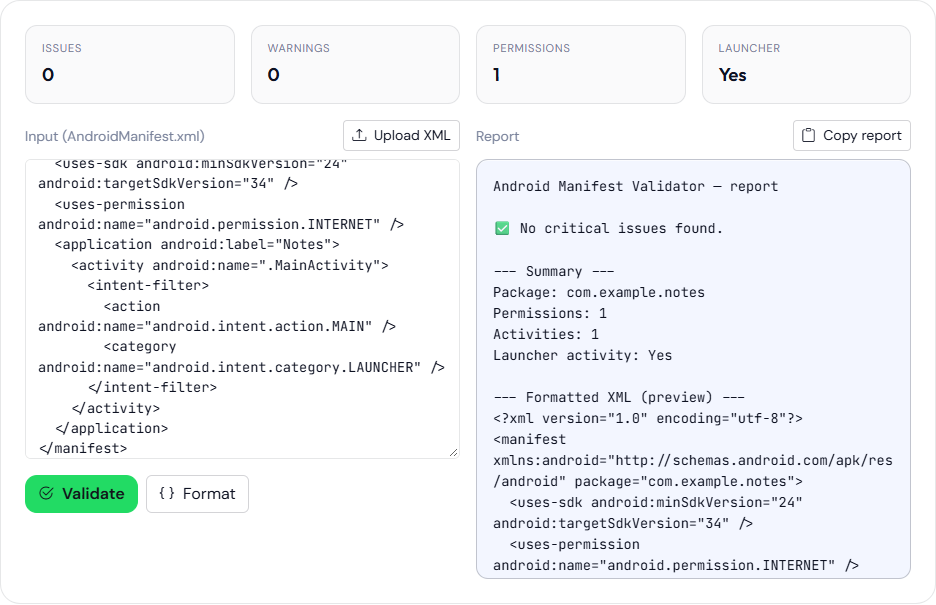
android:exported is not in the report.Install that activity on a device running API 31 or higher to see the failure. The figure above is the text check: issues 0, launcher yes, android:exported omitted. This page does not include an install-failure screen.
true and false are different decisions
Setting every component to exported="true" makes the install succeed and leaves activities, services, and receivers callable by other apps. Setting a non-launcher filter to false is often what you want: the component exists for your own app, not for the world. A share target or an App Link activity is a case where true is deliberate, because other apps and the browser must be able to start it.
Services and receivers follow the same rule. A BOOT_COMPLETED receiver has an intent-filter. On a target of 31 or higher it needs android:exported. For a receiver that only your app should send, false is the usual value, and the broadcast should be explicit. A file-provider or a content provider uses android:exported as well, but the API 31 install rule people hit first is the one on activities, services, and receivers that carry an intent-filter.
Aliases and properties in the merged manifest count. A library can add a component you never typed. Inspect the merged manifest under the build intermediates, or the XML apktool writes, not only the one file in app/src/main.
How to see the attribute when you only have an APK
The APK Analyzer will not show android:exported. Binary XML does not reliably contain the readable attribute text its string scan looks for, and the scan does not look for that attribute anyway. Use one of these:
aapt dump xmltree your.apk AndroidManifest.xml
apktool d your.apk -o out
In the apktool XML, search for intent-filter and read the parent element’s android:exported. Then decide true or false from the job of that component, and change the source manifest or a manifest merger rule. Repacking a one-line edit from apktool output is a debugging tactic. The next Gradle build overwrites it.
You can also install a build that targets 31 or higher on an API 31+ emulator. The package manager is the check the validator skips. adb install -r prints the failure in the terminal. The ADB command generator can print that install line. It does not run it and it does not parse the error.
A review order that does not pretend the browser is lint
- In source, set
android:exportedon every activity, service, and receiver that has an intent-filter. Do this in the module that owns the component, or with a merger rule if a library owns it and will not fix it. - Paste the text manifest into the validator for the checks it does implement: root, package, application, uses-sdk, permission names present, launcher pair. Treat a pass as “this text parsed,” not as “this APK installs on Android 12.”
- Run lint on the module. Read the exported finding if it fires.
- Install the release variant on an API 31 or newer system image. Keep the error text with the build number.
- If the only copy you have is an APK from someone else, use
aapt dump xmltreebefore you sideload it. A component exported without a reason is a reason to stop.
A service, written out
A started service that only your app binds to should not be exported. If a library added an intent-filter so the service can be started by a custom action, the filter triggers the API 31 rule:
<service
    android:name="com.example.notes.sync.SyncService"
    android:exported="false">
    <intent-filter>
        <action android:name="com.example.notes.action.SYNC" />
    </intent-filter>
</service>
false satisfies the installer. Other apps still cannot start it. Your own app starts it with an explicit intent that names the class. If you set true because the install failed and you wanted the error to go away, any app on the device can send com.example.notes.action.SYNC. That is a behavior change, not a paperwork change. Activity aliases follow the same attribute. Search for activity-alias in the merged manifest. A library’s alias is easy to miss in src/main because it is not in that file.
Deep links add intent-filters on purpose. Those activities should be exported, and the host checks are a different problem, covered in testing deep links. Export and App Link verification are not the same flag.