Published · Updated · 6 min read
Which Android question DroidXP answers, and which one aapt or apktool answers
These pages run in the browser on purpose, and they stop on purpose. Pick the row for the question you have. If the row says aapt, the browser result is not a substitute.
How to use the table
Each row is one question a developer actually asks while holding a file. The DroidXP column names the page and the mechanism in that page’s script. The other column names a tool that runs on a machine with the Android SDK or with Play Console. “No” in the DroidXP column means the script does not implement that check. It is not a roadmap item disguised as a feature.
The ten pages are the APK Analyzer, the string extractor, the manifest validator, the permissions decoder, the ADB command generator, the intent URL generator, the deep-link tester, the version checker, the icon generator, and the APK signer guide. Other utilities that used to sit on this domain are not part of this table.
Identity and archive
| Question | DroidXP | Use instead when you need the real answer |
|---|---|---|
| Is this the same file CI built? | APK Analyzer. SHA-256 of the whole dropped file via crypto.subtle. | Any local sha256sum or Get-FileHash. They should match the analyzer on the same bytes. |
| What is the package name, versionCode, and versionName? | Analyzer, only if those strings appear as printable ASCII inside binary XML. Often blank. | aapt dump badging. Play Console for the codes already used on a track. |
| How many DEX files, and is there a manifest entry? | Analyzer counts .dex names and looks for AndroidManifest.xml. | Same facts from unzip -l. aapt if you need to know the manifest is well formed. |
Which ABIs have .so files? | Analyzer lists lib/<abi>/*.so paths in the one ZIP you dropped. A split’s libraries are invisible until you drop that split. | aapt dump badging native-code line, or bundletool on the AAB. |
| Is this an App Bundle? | If the root manifest is missing and the entries look like a bundle, the analyzer says the manifest is missing. It does not unpack .aab as an app. | bundletool dump manifest and bundletool build-apks. |
Manifest, permissions, exported
| Question | DroidXP | Use instead |
|---|---|---|
| Does this text XML parse, and does it have a root, package, application, and launcher? | Manifest Validator. DOMParser on text. Warnings for uses-sdk, minSdk, missing android namespace, odd package pattern, permission without a name, no launcher. | Android lint and the merged manifest in Gradle outputs, which also see libraries. |
Is android:exported set on every filtered component? | No. The validator does not read the attribute. | Lint, aapt dump xmltree, and an install on API 31 or higher. |
| What does this permission constant mean in a short gloss? | Permissions Decoder, if the name is in the built-in table. Otherwise “unknown.” | The platform permission docs, and Play’s policy pages for restricted permissions. The table is not those docs. |
| Which permissions are in the built APK? | No. Paste text you obtained elsewhere. | aapt dump permissions. |
| Will Play accept this permission set? | No. | Play Console declaration forms and the current policy text. |
Signing, links, icons, versions
| Question | DroidXP | Use instead |
|---|---|---|
| Is the APK signed, and by which certificate? | No. The analyzer can show that META-INF entries exist. | apksigner verify --print-certs. Play Console for the app signing certificate versus the upload certificate. |
| What flags should keytool, zipalign, and apksigner use? | APK signer guide prints the commands. apksigner path aligns then signs. jarsigner path signs then aligns. Nothing is uploaded. | Run those commands in a terminal with build-tools on the PATH. Gradle’s signing block if the build already signs. |
| Does this URL match my intent-filter? | No. The deep-link tester parses the URL and prints adb shell am start -W -a android.intent.action.VIEW -d. | Run that command. Read the activity name. Check pm get-app-links for verification. |
Build an intent:// URL with a fallback? | Intent URL generator. Local string assembly, including S.browser_fallback_url. | Chrome on a device, because only the device applies the URL. |
| What does API 34 mean? | Version checker. A table from API 16 through API 36 baked into the script. Not a device probe. | The Android release notes when you need behavior changes. adb shell getprop ro.build.version.sdk for a connected phone. |
| Resize one image to 48, 72, 96, 144, 192, and 512? | Icon generator. Canvas PNGs, flat zip, optional padding and corner radius. | Image Asset Studio for adaptive XML, monochrome layer, and mipmap folders. |
| User-facing strings inside the APK? | String extractor. Raw strings.xml if a release accidentally contains it, otherwise a byte scan of resources.arsc with no resource IDs. | aapt or Android Studio’s APK Analyzer for the resource table. The real strings.xml in source for copy you can edit. |
A decision you can make in a minute
If the question is “what bytes do I have, and what are the entry names,” stay in the APK Analyzer. If the question is “what will the package manager believe,” go to aapt. If the question is “what will a phone do when I tap this,” go to adb and the phone. If the question is “what will Play allow,” go to Play Console. The browser pages are for the first kind of question and for preparing the text you paste into the second.
apktool sits in the middle. It decodes binary XML and resources into a folder you can read, and it can rebuild an APK. Rebuilding changes the signature. Use it to read a file you do not have source for. Do not use a rebuilt APK as the file you upload, unless you are deliberately repackaging and you understand the signature consequences. DroidXP never runs apktool and never rebuilds the archive.
Lint sits on source. It sees the merged manifest, the exported attribute, and a large set of API checks. Pasting a single AndroidManifest.xml from src/main into the validator misses library manifests. When lint and the validator disagree, lint is looking at a larger graph. Believe lint about that graph, and believe the validator about whether the text you pasted is well-formed XML.
Worked pick, three questions on one file
You have app-release.apk and no Android Studio window open.
- “Did QA download the CI file?” Analyzer SHA-256 versus the CI log. Both are whole-file hashes. This row ends in the browser if the hashes match.
- “What versionCode will Play see?” Analyzer hint if present, then
aapt dump badgingbefore you trust it. This row leaves the browser. - “Why did install fail on a Pixel with Android 14?” The error text about
android:exportedis the package manager.aapt dump xmltreeshows the attribute. The validator will not. This row leaves the browser even if you also paste the decoded XML to see the launcher warning.
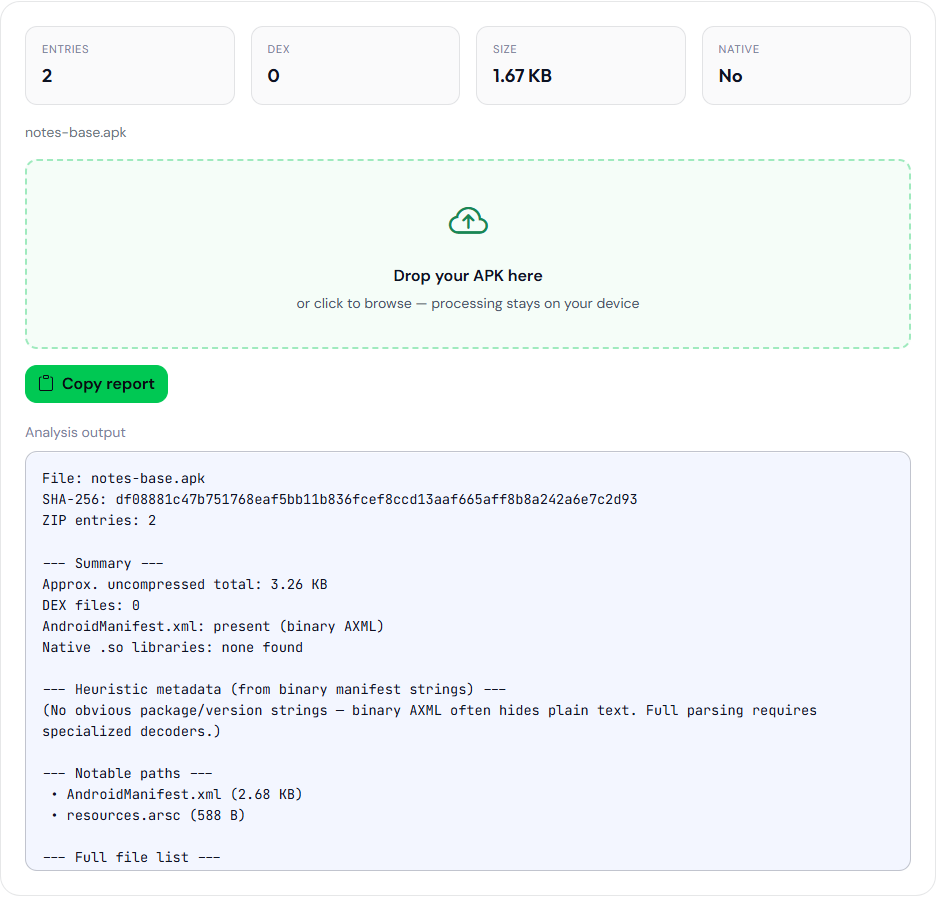
aapt dump badging on that file:
package: name='com.example.notes' versionCode='24003' versionName='2.4.0' platformBuildVersionName='16' platformBuildVersionCode='36' compileSdkVersion='36' compileSdkVersionCodename='16'
sdkVersion:'24'
targetSdkVersion:'34'
uses-permission: name='android.permission.INTERNET'
uses-permission: name='android.permission.CAMERA'
uses-permission: name='android.permission.READ_SMS'
uses-permission: name='android.permission.RECEIVE_SMS'
uses-permission: name='android.permission.QUERY_ALL_PACKAGES'
uses-permission: name='android.permission.MANAGE_EXTERNAL_STORAGE'
application-label:'Northwind Notes'
application: label='Northwind Notes' icon=''
launchable-activity: name='com.example.notes.MainActivity'  label='' icon=''
This is a sample APK built for the page, not a file from a Play track. The analyzer’s whole-file SHA-256 for it begins df08881c47b75176.
Do not pipe these pages into each other and call the chain a decode. The analyzer’s possible-package line is not input the validator trusts, and the validator’s pass is not input Play trusts. Copy text from a real manifest or from aapt when the next tool asks for text. The procedural version of the file pass is how to analyze an APK without installing it. This page is the index of jobs, not the walkthrough. Two of those jobs have their own write-ups: the merged manifest is not the XML you pasted, and a file hash is not a signing certificate.