Start from the declaration, not from the dialog
Google Play reviews the permissions an app declares, plus the forms you submit about those permissions. Android, separately, decides whether a declaration is enough or whether the user must also tap Allow at runtime. Mixing those three layers is how a build that installs cleanly still comes back from review.
The Permissions Decoder on this site only does the first layer, and only for a fixed list. You paste text. It looks for android:name attributes and for bare constants that start with android.permission. or android.hardware.. Each known permission is printed with the level stored in that page’s table: normal, dangerous, or special. Unknown names are printed as Level: unknown. Nothing is uploaded. Nothing is checked against your Play account.
The APK Analyzer does not extract a permission list. Packaged manifests are binary XML. The analyzer hashes the file, lists ZIP entries, and scans printable strings. If you need the declaration from a built APK, decode it with aapt dump permissions your.apk or apktool, then paste the text here. A blank heuristic block in the analyzer is not evidence that the app requests nothing.
What to paste
Paste the uses-permission elements, not a prose summary. The parser reads both quote styles:
<uses-permission android:name="android.permission.INTERNET" />
<uses-permission android:name="android.permission.CAMERA" />
<uses-permission android:name="android.permission.READ_SMS" />
<uses-permission android:name="android.permission.MANAGE_EXTERNAL_STORAGE" />
<uses-feature android:name="android.hardware.camera" android:required="false" />
It also accepts a flat list copied from aapt, because it matches android.permission.NAME with a capital-letter pattern. A sentence such as “we use the camera” produces no rows. A custom permission such as com.example.notes.permission.READ is ignored by the permission matcher, which only keeps names under android.permission.. Hardware features are listed separately and are not given a protection level.
Run the paste against the merged manifest, not a single library’s source file. Gradle merges manifests from the app module, flavors, and dependencies. A dependency can add READ_SMS even when your own XML never mentions SMS. The decoder cannot see the merge. You have to paste the result of the merge.
Sort the report into three piles
After you paste, split the decoded rows by the badge. The badge is this site’s label, taken from a curated table, not a live read of the platform’s protectionLevel.
| Badge on this site | What it means here | What you still have to check |
|---|---|---|
| normal | The table treats the permission as install-time. Examples in the list: INTERNET, VIBRATE, WAKE_LOCK, RECEIVE_BOOT_COMPLETED, FOREGROUND_SERVICE, USE_BIOMETRIC. | Normal does not mean “Play will ignore it.” Foreground services on recent API levels also need a service type. Boot receivers still need an exported decision. |
| dangerous | The table treats the permission as a runtime group on Android 6 and later. Examples: CAMERA, RECORD_AUDIO, location, contacts, SMS, call log, POST_NOTIFICATIONS, READ_MEDIA_IMAGES. | The user can deny it. The declaration can still be a policy problem even if the user would have allowed it. |
| special | The table marks access that is not a normal runtime dialog. In this list: MANAGE_EXTERNAL_STORAGE, SYSTEM_ALERT_WINDOW, WRITE_SETTINGS, PACKAGE_USAGE_STATS, REQUEST_INSTALL_PACKAGES, REQUEST_IGNORE_BATTERY_OPTIMIZATIONS. | These usually need a system Settings screen and, on Play, a declaration that matches a permitted use. |
| unknown | The name was parsed and is not in the table. | Look it up in the platform docs before you decide it is harmless. QUERY_ALL_PACKAGES is a common miss: it is not in this table. |
CHANGE_WIFI_STATE is labeled normal in the table because that is the platform protection level. An older copy of this page’s script had marked it dangerous. If you saved a report from before 15 October 2026, re-run the paste.
Names that regularly become a Play question
Play’s permission policy changes, and the form you fill in is the source of truth for your account. The list below is not a guarantee of approval or rejection. It is the cluster worth reading twice when it shows up in a decoder report, because each one is restricted or sensitive in Play’s published policies as of the last public policy text: SMS and call-log access, all-files access, install-from-unknown-sources, overlay windows, and background location.
- SMS:
SEND_SMS,RECEIVE_SMS,READ_SMS. The decoder marks them dangerous. Play treats SMS as a restricted permission. Default SMS apps and a short list of other core uses can be eligible. A notes app that pulled in an SMS dependency is not eligible just because the dependency is open source. - Call log:
READ_CALL_LOGandWRITE_CALL_LOG. Same shape as SMS: dangerous at runtime, restricted on Play.CALL_PHONE,ANSWER_PHONE_CALLS, andREAD_PHONE_STATEare different constants. Do not file them under “phone” and stop reading. - All files access:
MANAGE_EXTERNAL_STORAGEis special in the table. Scoped storage and the media permissions are the usual replacement.READ_EXTERNAL_STORAGEandWRITE_EXTERNAL_STORAGEcan still appear on older minSdk lines; on newer targets they do not grant the access people remember from Android 9. - Media on Android 13 and later:
READ_MEDIA_IMAGES,READ_MEDIA_VIDEO,READ_MEDIA_AUDIO. Dangerous in the table. A photo feature that only needs one image often should use the system photo picker and declare none of these. - Location: fine, coarse, and
ACCESS_BACKGROUND_LOCATIONare all dangerous here. Background location is a separate Play declaration from foreground location. The decoder will not tell you whether your service actually runs in the background. - Packages and overlays:
REQUEST_INSTALL_PACKAGESandSYSTEM_ALERT_WINDOWare special. Sideload helpers and chat-head overlays are the usual reasons they appear, and both have Play declarations.
Camera, microphone, contacts, and notifications are dangerous in the table and obvious to a user, but they are not in the same restricted bucket as SMS. They still belong on the Data safety form. That form is not generated by this site.
A leftover-library paste
This sample is invented so the steps are concrete. It is not a report from an app published here. Imagine a release manifest after a merge with an old “share via SMS” library the product no longer calls:
<uses-permission android:name="android.permission.INTERNET" />
<uses-permission android:name="android.permission.ACCESS_NETWORK_STATE" />
<uses-permission android:name="android.permission.CAMERA" />
<uses-permission android:name="android.permission.READ_SMS" />
<uses-permission android:name="android.permission.RECEIVE_SMS" />
<uses-permission android:name="android.permission.QUERY_ALL_PACKAGES" />
The decoder should mark INTERNET and ACCESS_NETWORK_STATE normal, CAMERA dangerous, and both SMS permissions dangerous. QUERY_ALL_PACKAGES should come back unknown, because it is absent from the built-in list. The unknown row is the one to look up. Removing an unused SMS library is a manifest edit and a dependency edit. Deleting the line from a decompiled XML and repacking the APK is not a fix you can trust; the next build will merge it back.
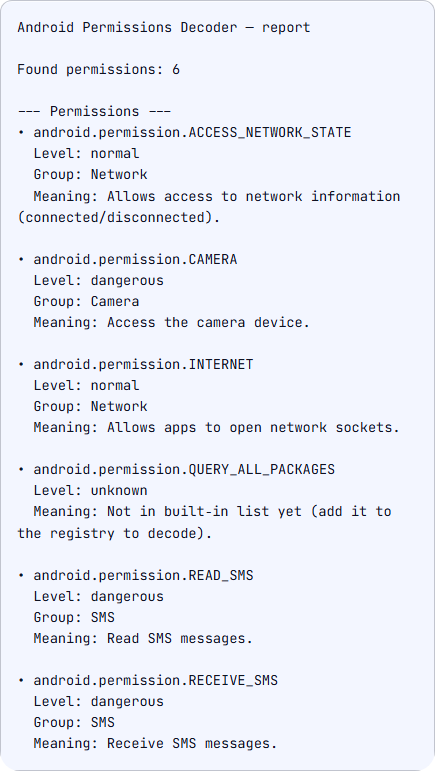
QUERY_ALL_PACKAGES is unknown. This is the sample written for this page, not an app published here.aapt dump permissions on the sample APK built for this page (com.example.notes, not a Play release):
package: com.example.notes
uses-permission: name='android.permission.INTERNET'
uses-permission: name='android.permission.CAMERA'
uses-permission: name='android.permission.READ_SMS'
uses-permission: name='android.permission.RECEIVE_SMS'
uses-permission: name='android.permission.QUERY_ALL_PACKAGES'
uses-permission: name='android.permission.MANAGE_EXTERNAL_STORAGE'
What a green report cannot mean
The decoder does not know whether the user granted the permission, whether you call requestPermissions, or whether a maxSdkVersion attribute limits an old storage permission. It does not read tools:node="remove". It does not open Play Console, and it does not fill Data safety, advertising ID, or photo-and-video declarations.
It also does not understand permission groups at runtime. On Android 6 and later, requesting one dangerous permission can surface a group the user sees as “Contacts” or “SMS.” The badge text is not that dialog copy.
If the pasted file is the human-readable manifest from source control, it may be incomplete. Flavor-specific manifests and manifest placeholders such as ${applicationId} are passed through as text. Placeholders are not expanded.
A short path that stays honest
- Produce the merged manifest or
aapt dump permissionsfrom the artifact you will upload. - Paste it into the decoder. Keep the unknown rows. Do not delete them to make the report look tidy.
- For every special row, and for SMS, call log, all-files access, and background location, open the current Play policy page and the declaration form. Write down the core feature that needs the permission, or remove the permission.
- Match the remaining dangerous rows to a screen in the app that explains the request before the system dialog. The companion post on what users notice is about that moment. It is not a second copy of this policy list.
- Re-run the paste on the release build, not the debug build. Debug manifests often add extra permissions.
When the text manifest is the thing you are editing, the Manifest Validator checks structure: root element, package attribute, application element, uses-sdk, and a launcher activity. It does not grade permissions against Play policy. Use both tools for different questions.