Two certificates, two files
With Play App Signing, you hold an upload key. You sign the Android App Bundle, or the APK, with that key and you upload it. Google checks the upload signature, strips it, and signs the APKs it delivers with the app signing key. The app signing key is what devices verify. Unless you created the app before Play App Signing and chose to keep using the same key, the certificate on the uploaded artifact and the certificate on the installed APK are not the same certificate.
That is why a SHA-256 of the file on your disk and a SHA-256 of the file installed from Play differ even when both installs run the same versionName. The bytes differ because the signature block differs. Version code and application id can still match. Comparing those hashes as if they were a corruption check produces a false alarm.
The reverse mistake is treating a hash match as proof of Play’s signature. If you sideload the exact APK you uploaded, the hash matches because it is the same file. That test never touched the app signing key.
What the analyzer hashes
The APK Analyzer reads the dropped file into an ArrayBuffer and calls crypto.subtle.digest('SHA-256', buffer) on that buffer. The hex string is of the entire file, including the local file headers, the ZIP entries, and whatever signing block is already inside it. It is not the SHA-256 of the signing certificate. It is not the hash Play Console shows under App signing, and it is not the checksum of a single ZIP entry.
META-INF names appear in the file list when they exist. Their presence means those entries are in the archive. It does not mean apksigner verify would pass, and it does not distinguish an upload signature from an app-signing signature. The tool never asks you for a keystore and never sends the APK anywhere.
JSZip has to load from the jsDelivr CDN before the listing works. If that script is blocked, the page stops with a load error. The hash cannot be computed by a fallback parser because the page does not contain a second ZIP implementation.
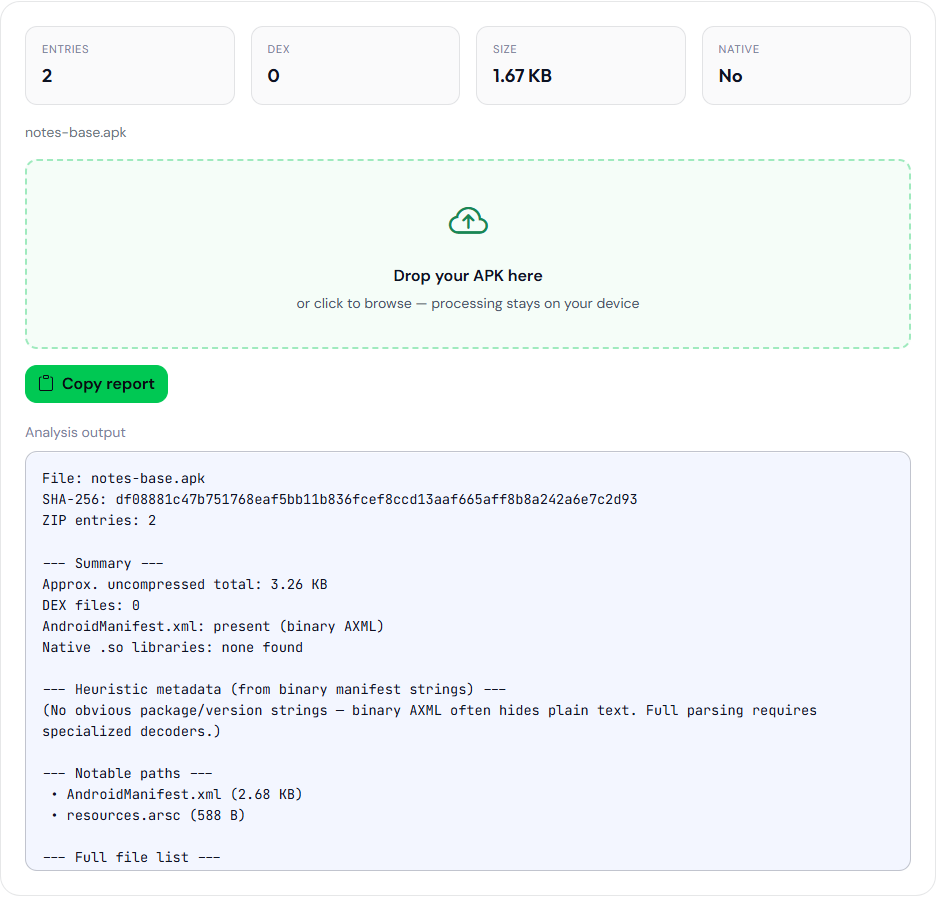
notes-base.apk: df08881c47b751768eaf5bb11b836fcef8ccd13aaf665aff8b8a242a6e7c2d93. This is the file on disk. It is not an APK installed from Play.When you have the APK that Play installed for that versionCode, write its SHA-256 next to the digest above. The figure is the sample file on disk, not a Play download.
Which hash to write down, and when
| File in your hand | Hash it for | Do not expect it to match |
|---|---|---|
| The AAB or APK CI just built, before upload | The release ticket and the git tag, so you can prove which bytes were uploaded. | The APK a tester installs from the Play track after app signing. |
The same APK, sideloaded with adb install | A check that the phone received the file you think it received. Pulling the APK back and hashing it should match the desk hash if nothing re-signed it. | A Play-delivered install of a different byte stream. |
| An APK saved from a device that installed via Play | A record of what that device actually ran. | The upload artifact. Compare versionCode and application id instead, then compare certificates if you need to know which key signed it. |
Certificate fingerprints are a different command from a whole-file hash. apksigner verify --print-certs your.apk prints the signer certificates inside that file. Play Console prints the app signing certificate and the upload certificate on the App signing page. Compare those fingerprints when the question is “which key,” and compare the analyzer’s SHA-256 when the question is “which file.”
Commands the signer page will print
The APK signer guide does not sign anything in the browser. It prints shell text from the form fields. Default names are release.keystore, alias release, app-release-unsigned.apk, app-release-aligned.apk, and app-release-signed.apk. You can change the strings. The page does not check that the files exist.
With the method set to apksigner, the blocks are:
keytool -genkeypairto create a keystore. The page tells you the password prompt is yours to answer. It does not invent a password and it does not add--ks-passunless you are looking at a comment that says not to put passwords in the command.zipalign -v -p 4from the unsigned APK to the aligned APK. Page size alignment is required before apksigner.apksigner sign --ks … --ks-key-alias … --out signed aligned. If the v1+v2 checkbox is on, the command also passes--v1-signing-enabled true --v2-signing-enabled true.apksigner verify --verboseon the signed output.
With the method set to jarsigner, the order is the legacy v1 order: sign the unsigned APK in place, then zipalign -p 4 to the aligned file, then jarsigner -verify. jarsigner does not produce a v2 signature. Play’s current uploads want an APK Signature Scheme that apksigner produces. Use the apksigner method unless you are maintaining an old pipeline on purpose.
Those commands create or use an upload key if you later enroll that certificate as the upload key. They do not create Google’s app signing key, and they do not download the APK Play delivers. Running them on a build that Gradle already signed with the upload key will sign it again only if you point them at an unsigned file. Pointing apksigner at an already-signed Play artifact is not how you reproduce the app signing certificate.
A mismatch that is a real problem
Not every mismatch is Play App Signing. These are mismatches worth stopping for:
- Two CI jobs claim the same versionCode and the analyzer shows two different SHA-256 values. You have two artifacts. Only one of them should be uploaded. See the three identity fields.
apksigner verifyfails on the file you are about to upload. The analyzer can still hash it. A hash is not a signature check.- A tester sideloaded a file whose hash matches neither the CI artifact nor a Play install. You do not know what they ran.
- The upload certificate in Play Console does not match
apksigner verify --print-certson the AAB you just built. The upload will be rejected. The analyzer’s file hash will not explain that rejection.
apksigner verify --print-certs on the signed copy of that sample. Subject CN=Example. This fingerprint is the sample key, not an upload certificate enrolled in Play Console. The Play Console row is not shown.
Signer #1 certificate DN: CN=Example
Signer #1 certificate SHA-256 digest: 6013eea4f0172bbc2fac2f69d7bf96a2fe59635780ed8c4dfc7ae1a84fd92e67
Signer #1 certificate SHA-1 digest: 538fc0d15357e679e633566aa8ce64a788b392d4
Signer #1 certificate MD5 digest: 5d9cc7c2fde1214faccc7eebdc2cee87
Compare a Play Console upload-certificate fingerprint with the digest above when you have one from an app you publish. The digest here is the sample certificate CN=Example.
What to store with the release
Store the whole-file SHA-256 of the uploaded AAB or APK, the versionCode, the applicationId, and the upload-certificate SHA-256 from apksigner verify --print-certs. Store the app-signing certificate fingerprint from Play Console once, when it is first shown, and expect installed APKs to match that certificate rather than the upload certificate. Keep the keystore out of the git repo. The generator’s keytool line is a reminder of the flags, not a place to paste the keystore password into a ticket.
If JSZip fails or the file is a bundle, do not invent a hash by renaming the bundle. Hash the bundle with a local tool (sha256sum or Get-FileHash) and say which container you hashed. The command order and the certificate-versus-file distinction are written out in a file hash is not a signing certificate.