Name the file before you read the listing
Three different containers get called “the build” in conversation:
| What you were handed | What it is | What this site does with it |
|---|---|---|
app-release.apk that installs by itself | A base APK. One ZIP. Manifest, DEX, resources, and any lib/<abi>/*.so the build put in this file. | The APK Analyzer lists entries, counts DEX, notes lib/*.so, hashes the whole file, and scans the binary manifest for a few ASCII strings. |
base.apk plus split_config.arm64_v8a.apk and maybe split_config.xxhdpi.apk | A split set. The package manager installs them together. Each file is its own ZIP. | Dropping only the base lists only the base. Native code that lives in the ABI split is invisible. |
app-release.aab | An Android App Bundle. A ZIP with a different layout (base/, BundleConfig.pb, and module directories). Not an installable APK. | The analyzer does not treat a bundle as an APK. Renaming it to .apk does not make it one. Use bundletool to build APKs, then drop those APKs. |
The analyzer’s native-library line is a boolean: any entry whose path starts with lib/ and ends with .so flips it to “detected.” It does not print the ABI folder name in that summary line. The full file list under the summary does include paths such as lib/arm64-v8a/libfoo.so, truncated in the “notable paths” section after 40 lines and printed in full further down. Read the path. “Detected” does not tell you whether you also shipped armeabi-v7a by mistake, or whether you failed to ship arm64-v8a.
A base listing that looks native-free
Suppose the set on disk is:
com.example.notes.apk                  (base)
com.example.notes-arm64_v8a.apk        (config split)
com.example.notes-xxhdpi.apk           (density split)
Drop the base. A consistent report can say Native .so libraries: none found and still be a correct description of that ZIP. The .so files are in the arm64 split, under lib/arm64-v8a/. Drop the arm64 file and the boolean flips, while that split may have no classes.dex and may still have a manifest. Neither drop is the installed app. The installed app is the set.
Density splits fail the same way in reverse. Strings and drawables you expected in the base can live in split_config.xxhdpi.apk. The string extractor reads resources.arsc inside the one file you give it. A thin base can produce a short scan even when the density split is full of UI text.
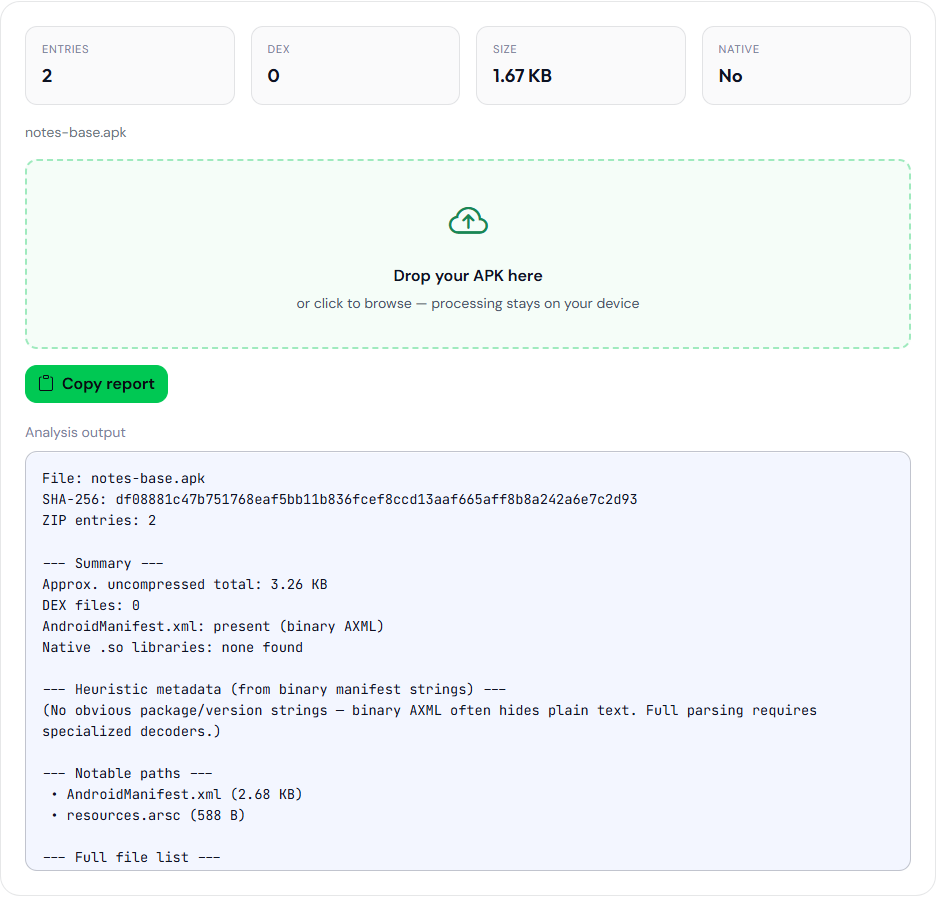
notes-base.apk. Native libraries: none found. This file has a manifest and resources.arsc, and no lib/ entry.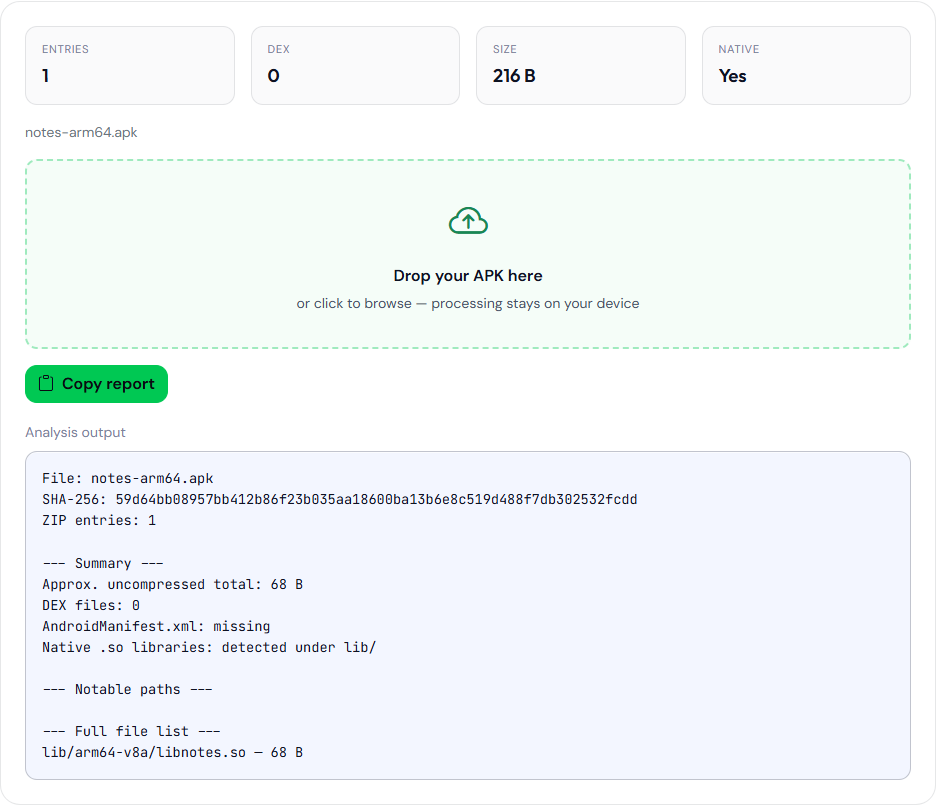
notes-arm64.apk is a one-entry ZIP built for this page so the file list would show lib/arm64-v8a/libnotes.so. It is not a split Play generated. The manifest line says missing, and the native line says detected.What a browser can and cannot reconstruct
JSZip reads the central directory of one archive. It does not know that another file in the same folder is a sibling split. It does not read META-INF/*.SF as a signature verdict. Those files show up in the notable-path list when the name starts with meta-inf/, which only tells you the entries exist.
DEX count is a count of entry names ending in .dex in that ZIP. classes.dex plus classes2.dex is two. A split that contains only resources can legitimately show zero. Zero DEX in a file you believe is a standalone app means you have the wrong file, a truncated download, or a bundle that was not an APK.
The SHA-256 line is the hash of the dropped bytes, not of the set, and not of the APK Play will deliver after app signing. Hash each split separately if you need to compare them to CI artifacts.
Entry sizes in the report are uncompressed sizes when JSZip exposes them. They are a way to spot a 40 MB library inside one slice. They are not the download size Play shows to a user on a given device.
How to get a single APK when you only have a bundle
bundletool, from the Android SDK extras or the GitHub releases, builds an APK set from a bundle. A typical local check uses a universal APK so one file contains the ABIs you care about:
java -jar bundletool.jar build-apks --bundle=app-release.aab --output=out.apks --mode=universal
unzip out.apks -d out
The universal APK inside that .apks zip is the file to drop on the analyzer. It is larger than any one device would download. That is the point of the check: you can see ABIs and DEX that a single config split would hide. It is still not the Play-delivered byte stream.
Device-specific APKs from build-apks without --mode=universal bring you back to the split problem. Drop each one, or install the set with bundletool, but do not conclude “no native code” from the base alone.
List the entries in a .apks archive from your own bundletool build-apks run, and name which entry you opened in the analyzer. The arm64 figure on this page is a hand-made ZIP with one lib/arm64-v8a entry, not a Play split set.
False negatives worth writing next to the report
- No native libraries. Confirm you did not drop only the base or a density split. Open the arm64 (and any other ABI) split, or a universal APK.
- No strings. The string extractor’s raw
res/values*/strings*.xmlpath is usually empty on release builds. The ARSC scan is a byte scan, and it only sees the ARSC inside the dropped file. - No versionCode. The analyzer’s version line is an ASCII guess inside binary XML. Splits can carry a manifest that does not repeat the version strings in a form the guesser sees. Use
aapt dump badgingon the base APK. - The ZIP opened, so it is an APK. A bundle is also a ZIP. If the first entries are
BundleConfig.pbandbase/manifest/rather than a rootAndroidManifest.xmlandclasses.dex, you are not looking at an installable APK. The analyzer marks the manifest missing in that case. Believe that line.
When to leave the tab
aapt dump badging on the base APK prints the package name, versionCode, versionName, and native-code ABIs the badging block knows about. bundletool dump manifest --bundle app-release.aab prints the manifest from the bundle without pretending the bundle is an APK. Play Console’s app bundle explorer shows the APKs Play would generate for a device. None of those run in this browser.
Names that identify the container
You do not need a deep parser to tell the three containers apart. A standalone APK has AndroidManifest.xml and classes.dex at the root of the ZIP. A config split often has a short entry list and a name containing split_config or an ABI. A bundle has BundleConfig.pb at the top level and a base/ directory whose manifest is not the root AndroidManifest.xml the analyzer looks for. If you drop a bundle and the report says the manifest is missing, stop and read the first screen of the full file list. Those names are the identification. Do not “fix” the report by renaming the file to end in .apk and dropping it again. The bytes did not become an installable APK.
Use the analyzer as a first look at one file you already have: hash, entry names, DEX count, whether lib/ contains a .so. Use bundletool or aapt when the question is about the set or the bundle. The identity fields on the base APK are covered in versionCode, versionName, and applicationId.